Connector basics

How Connectors Work

A connector is StackJack's link between your AI assistant and one of the MSP tools you already use — your PSA, RMM, documentation platform, or security product. Once a connector is configured, your AI…

Written By Christopher Scaminaci

Last updated 3 days ago

A connector is StackJack's link between your AI assistant and one of the MSP tools you already use — your PSA, RMM, documentation platform, or security product. Once a connector is configured, your AI assistant can call that product's API through StackJack's MCP tools (MCP is the Model Context Protocol — the open standard AI assistants use to call external tools).

Every connector StackJack supports today is listed below, with a link to its setup guide. Datto SaaS Protection appears in the Portal as coming soon and cannot currently be configured, so it is not in this list.

ConnectorCategoryHow it authenticatesPer-user sign-in available
3CXPhone system (PBX)PBX address + dedicated API client ID + API keyNo
AbleSignDigital signageAPI keyNo
Acronis Cyber Protect CloudBackup / DR / securityAPI client ID + secret + your data center URLNo
Action1RMM / patchingAPI client ID + secretNo
AddigyApple device managementAPI tokenNo
AlertOpsOn-call / alertingAPI keyNo
Alloy NavigatorITSM / asset managementAPI URL + application account ID and secretNo
Alternative PaymentsPayments / accounts receivableAPI key (client ID + client secret) and Production or DemoNo
Anthropic AdminAI provider administration (read-only)An Admin API key (Claude Console) or a scoped key (Claude Enterprise)No
AteraRMM + PSAAPI keyNo
Autotask PSAPSAAPI integration code + API-only user's username and secretNo
AuvikNetwork monitoringDedicated user name + API key + cluster URLNo
Avanan (Check Point Harmony Email)Email securityInfinity Portal client ID + secret key, plus your regionNo
AxcientBackup & BCDRAPI keyNo
Bitdefender GravityZoneEndpoint securityAccess URL + one API key, with its API groups fixed at creationNo
Blackpoint CompassOneMDR / security operationsAPI keyNo
Bluechip InfotechIT distribution (Australia)EDI partner username + passwordNo
Confluence Data CenterDocumentationPersonal access token + your server addressNo
PowerDMARCEmail security (DMARC)API token (+ optional MSSP portal address)No
CYRISMASecurityAPI key (client ID + secret)No
DropsuiteBackup and continuityReseller token + admin tokenNo
MSPbotsBusiness intelligenceAPI keyNo
N-able Cove Data ProtectionBackup and continuityPartner name + API user email + passwordNo
AvePointBackup and continuityApplication (client) ID + client secret or certificate (+ optional second registration for Cloud Backup)No
CIPPMicrosoft 365 managementAzure AD app registration (6 values)No
Cisco DuoIdentity / MFAAPI hostname + separately signed Admin API and optional Auth API key pairsNo
Cisco MerakiNetworking / securityAPI keyNo
Cisco UmbrellaDNS / web securityAPI key + secretNo
CloudflareDNS / CDN / Zero Trust / object storageScoped API token (optional account ID for an account-owned token)No
ConnectWise AutomateRMMIntegrator username + password (StackJack's ConnectWise client ID by default; optional authenticator seed)No
ConnectWise Platform (Asio)RMM / NOC & SOC servicesAPI key Client ID + secret, plus your regionNo
ConnectWise PSAPSACompany ID + API-member public/private keys (StackJack's ConnectWise client ID by default)No
ConnectWise SellQuotingAccess key + API username + passwordNo
CorkCyber warranty / risk managementAPI keyNo
CrayonDistribution / cloud licensingAPI client ID + secret, plus a dedicated Cloud-iQ API user's name and passwordNo
CrewhuCSAT surveying / employee recognitionOpen API tokenNo
CrowdStrike FalconEndpoint detection & responseAPI client ID + secret, plus your Falcon cloud regionNo
Customer ThermometerCSAT / NPS surveyingAPI key (the sub-API key)No
CyberCNS (ConnectSecure)Vulnerability managementTenant name + client ID + secretNo
CyberFOX AutoElevatePrivileged access managementOne Bearer API key (it expires on the date you choose)No
CyberQPPrivileged access managementAPI credentials (generated via a one-time browser consent)No
D&H DistributingDistribution / procurementREST client ID + secret + account number, XML user code + password, or bothNo
Datto BCDRBackup & BCDRPartner Portal public key + secret keyNo
Datto EDREndpoint detection & responseYour instance address + one API tokenNo
Datto RMMRMMAPI key + secret keyNo
DefensXWeb & DNS securityPartner API tokenNo
Dicker DataDistribution / procurementAccess token + account code, plus country and live-or-sandboxNo
DMARC ReportEmail security (DMARC)API tokenNo
dmarcianEmail security (DMARC)API token + your Region (one of six dmarcian instances)No
DNS Made EasyDNS hostingAPI Key + Secret Key, plus production or sandboxNo
DNSFilterDNS securityAPI tokenNo
DomotzNetwork monitoringAPI key + account-specific regional cell URLNo
EasyDMARCEmail authentication (DMARC / SPF / DKIM)API client ID + secret, plus an optional default organization IDNo
Employment HeroHR and payrollOAuth (your own Employment Hero API application: Client ID + Client Secret; an admin signs in once; one connection per customer organisation)No
ESET PROTECTEndpoint securityAPI user username + passwordNo
Field EffectManaged detection & responseAPI keyNo
FirefliesMeeting notes / transcriptsPersonal API key (reads what its owner can read)No
Fortinet FortiGate and FortiManagerFirewalls / network securityFortiGate Cloud or FortiManager Cloud: a FortiCloud IAM API user (API ID + password), plus your region or instance URL. A FortiManager you run: its address + a REST API administrator keyNo
GitHub CopilotAI provider administration (read-only)A GitHub token (organization or enterprise) + the account nameNo
GoGetSSLSSL certificate reselling and LEI registrationAPI username (your client-area login) + API passwordNo
Google AdsAdvertising / marketingService account email + private key on your own Google Cloud project, plus an optional manager account IDNo
Google WorkspaceIdentity / productivity suiteService account key + an admin email to act as (domain-wide delegation)No
GoreloRMM + PSAAPI keyNo
GrafanaObservability / dashboards & alertingYour Grafana address + a service account tokenNo
HaloPSAPSAOAuth sign-in (recommended) or client ID + secretYes
HuduDocumentationAPI keyNo
HuntressSecurityAPI key + secret keyNo
ImmyBotEndpoint automationMicrosoft Entra app registration, or a personal access tokenNo
Ingram MicroDistribution / procurementOAuth client ID + secret + account context; optional Cloud Marketplace credentialsNo
InforcerMicrosoft 365 policy managementAPI client (client ID + secret) and the region it was created inNo
intelliGRCCompliance / GRCAPI client ID + secret + tenant IDNo
IRONSCALESEmail securityAPI keyNo
Island BrowserEnterprise browser / endpoint securityAPI key + your Island regionNo
IT GlueDocumentationAPI keyNo
ITQuoterQuoting / procurementYour API URL + an access key and secret keyNo
Jamf ProApple device managementYour Jamf Pro server URL + an API client ID and secretNo
Jira Service ManagementService desk / PSA, on-call & AssetsAtlassian sign-in, no keys to create (one connection per Jira site)No
Kaseya Quote ManagerQuotingAPI keyNo
Keeper SecurityPassword managementAPI credentials (provisioning / MSP / Billing / SCIM, as used)No
LastPassPassword managementAPI key, or Enterprise API account number + provisioning hash, or bothNo
LexfulDocumentationAccount ID + API key ID + API key secretNo
LiongardAttack surface managementAccess key + secretNo
Microsoft AzureCloud infrastructureMicrosoft sign-in — no keys to createYes
Microsoft Defender for EndpointEndpoint detection & responseMicrosoft sign-in, no keys to create, plus one administrator approval per directoryYes
Microsoft Exchange OnlineMail & mail flow administrationMicrosoft sign-in, no keys to create, plus one administrator approval per directoryYes
Microsoft PurviewCompliance, labels & eDiscovery administrationMicrosoft sign-in, no keys to create, plus administrator approvals per directoryYes
Microsoft GraphMicrosoft 365 managementMicrosoft sign-in — no keys to createYes
Microsoft Power Platform AdminPower Apps, Power Automate & Copilot Studio administrationMicrosoft sign-in, no keys to create, plus administrator approvals per directoryYes
Microsoft SharePoint AdminSharePoint & OneDrive administrationMicrosoft sign-in, no keys to create, plus one administrator approval per directoryYes
Microsoft Teams AdminTeams policy & settings administrationMicrosoft sign-in, no keys to create, plus one administrator approval per directoryYes
MimecastEmail security & archivingAPI 2.0 application client ID + secretNo
Moovila Perfect ProjectProject managementOne-time authorization of a Moovila OAuth applicationNo
MSP360Backup & BCDRManaged Backup API Login + Password; optional RMM API tokenNo
MySonicWallPartner portal / licensing & tenant administrationPersonal API key (one MySonicWall user's key, valid one year at most)No
N-able N-centralRMMUser-API Token (JWT)Yes
N-able N-sight RMMRMMAPI key + your N-sight territoryNo
NinjaOneRMMOAuth sign-in (recommended) or client ID + secretYes
OpenAI AdminAI provider administration (read-only)An organization Admin key (API Platform) or a workspace key (ChatGPT)No
Paessler PRTGNetwork monitoringYour PRTG server address + an API keyNo
PagerDutyOn-call & incident responseAPI access key + the email address of a PagerDuty user to act as, plus your service regionNo
Pax8Distribution / marketplaceAPI application client ID + secretNo
Petra SecurityIdentity threat detectionAPI keyNo
PrintixCloud print managementClient ID + secret, plus the Printix application type you createdNo
Propel Your MSPvCIO / QBR planningClient ID + secret from Settings, API Access (a paid Propel add-on)No
QuickBooks OnlineAccountingIntuit sign-in — no keys to create (one connection per QuickBooks company)No
Reddit AdsAdvertisingOAuth (your Reddit app ID + secret; an admin authorizes once)No
RedstorBackup & BCDRService account Client ID + the private .jwk key fileNo
RewstAutomation platform (workflows, forms, apps)New Rewst AI Access token (Settings > AI Access > Create Token)No
RoboShadowVulnerability managementPortal refresh token (plus an optional organisation ID)No
ScalePadAsset lifecycle / compliance / quoting / backupOne or more regional personal API keysNo
SentinelOneEndpoint securityYour console address + one API tokenNo
SherwebDistribution / marketplaceAPI client ID + secret + subscription keyNo
SlideBackup & BCDRAPI tokenNo
SpamTitanEmail securityAPI token + your Location (a cloud cluster or your own host)No
SuperOpsPSA + RMMAPI token + MSP subdomainNo
SyncroPSA / RMMAPI tokenNo
TD SYNNEXDistribution / procurementStreamOne ION refresh token + account ID, hardware XML credentials, or bothNo
TelivyCyber risk assessmentAPI keyNo
TeramindEmployee monitoring / insider riskYour Teramind address + a static access tokenNo
ThreatLockerZero Trust endpoint securityAPI User token + instance URL + organization IDNo
Time DoctorTime tracking / workforce analyticsA Time Doctor user's email + password, plus the authenticator seed when that account uses two-factorNo
TimeZestSchedulingAPI key (read/write if you want it to book)No
TPP WholesaleDomains, DNS and hosting resellingAPI key + secret key (StackJack's addresses allow-listed on the key)No
TwilioCommunications (texts, calls, verification)Account SID + Auth Token, or an API key (SID + secret) with the Account SIDNo
Ubiquiti UISPISP network managementYour UISP address + an NMS token, a CRM app key, or bothNo
UniFiNetwork / physical securityCloud API key; optional per-console or direct-controller keysNo
VantaCompliance / GRCClient ID + client secret of a Manage Vanta applicationNo
VeeamBackup & recovery (Service Provider Console, Backup & Replication, Backup for Microsoft 365)Service Provider Console address + user name and password or API key; optional direct address + login for Backup & Replication and Backup for Microsoft 365No
WatchGuard CloudNetwork & endpoint securityAccess ID + Password + a separate API Key, plus your account ID and regionNo
WordPressWebsites / content managementSite address + a WordPress username + an application password, one connection per siteNo
XeroAccounting / payrollCustom Connection Client ID and Client Secret + the scopes it was granted (one connection per Xero organization)No
Yeastar P-Series PBXPhone systemsThe PBX's address + a client ID and secret minted on that PBXNo

"Per-user sign-in available" means individual team members can connect with their own vendor identity instead of everyone sharing one credential — see Shared vs Per-User Credentials.

Several connections of one connector

Some products give one MSP credential that reaches every customer you manage. Many do not: you get one server, one site or one account per customer, and one set of credentials for each. StackJack lets an organization hold several named connections of the same connector, and your AI names the one it wants on each call.

You need this when the product has no partner console you can reach every customer through — Jamf Pro, CrowdStrike Falcon without Flight Control, Google Workspace without reseller access, Yeastar, Teramind, PRTG, Alloy Navigator, Datto EDR and Cisco Duo are the common ones. It is also useful whenever you simply have two of something: a second HaloPSA after an acquisition, a second Meraki organization, a second ESET console.

Adding one

  1. Open Connectors and find the connector's card.
  2. Open the card and choose Add connection.
  3. Give it a name and enter that customer's credentials.

Name a connection after the customer, not after the product. Your AI reads the names, so "Acme Manufacturing" tells it far more than "Jamf 2". When you add a second connection and the first one has no name yet, StackJack asks you to name that one too, so the AI is never choosing between "Jamf Pro" and "Acme Manufacturing".

The first connection you add for a connector becomes the default. You can change which one is the default from the same list.

How your AI picks one

Every tool of a connector that has two or more connections gains an optional connection argument, and the tool's own description lists the names. Your AI passes a connection's name and the call runs against that customer:

"In Acme Manufacturing, which Macs are still on macOS 14?"

Omit it and the call runs against the default connection. You can also ask your AI to list what is available — it has a tool that reports every connection of every connector, which one is the default, and whether each is healthy.

Pinning an endpoint to one connection

If you would rather an AI could not reach past one customer at all, pin the endpoint. Open Endpoints, edit the client, and set that connector's Pinned connections choice. A pinned client uses its pinned connection for every call, and naming any other connection is refused rather than quietly redirected. That makes a pin the right tool when you hand one customer their own AI access.

Endpoints without a pin stay unpinned and keep the full choice.

Billing

Connections do not change what you pay. A connector has one subscription, one plan and one monthly call limit, shared by all of its connections. Ten Jamf Pro connections are one Jamf Pro subscription, and calls to all ten count against the same monthly allowance.

Removing one

Removing a connection deletes its credentials, and the team members' personal sign-ins that belonged to it go with it. N-able N-central is the one exception: a member's own N-central token is theirs, so it stays until they remove it from their personal sign-ins. If you remove the connection that is currently the default, the oldest remaining working connection of that connector becomes the new default, so the connector keeps working for anything that does not name a connection. Any endpoint pinned to the connection you removed becomes unpinned. The connector itself stays connected until you remove its last connection — see Disconnecting a Connector.

Where your credentials are stored

Connector credentials are the most sensitive data you give StackJack, so they are handled with a strict storage model:

  • Secrets live in Azure Key Vault, not in StackJack's database. When you save a connector, the API keys and secrets you enter are written to a dedicated secret in Azure Key Vault. StackJack's database stores only a reference to that secret — never the secret itself.
  • Every tenant's credentials are isolated. Each secret is scoped to your tenant (and, for per-user connections, to the individual team member). One tenant's credentials are never used to serve another tenant's requests.
  • Secrets are never displayed again. After you save, the portal never echoes a secret back — not in the configure dialog, not in any admin view. When you edit a connected card, secret fields are blank; you either enter a new value or, for some connectors, leave the field blank to keep the current value.
  • Deleting is real. Disconnecting a connector deletes the stored secret from Key Vault (see Disconnecting a Connector).

A few vendors ask for an identifier for the integration itself as well as the credential that grants access to your data. For ConnectWise PSA and ConnectWise Automate, StackJack supplies its own ConnectWise client ID, so you enter only your own credentials; a company that already uses its own client ID can enter it under Advanced. Autotask requires an API integration code alongside its API-only user. You enter both values in the same configure dialog, and StackJack stores them together as one credential — see each connector's guide for where to obtain them.
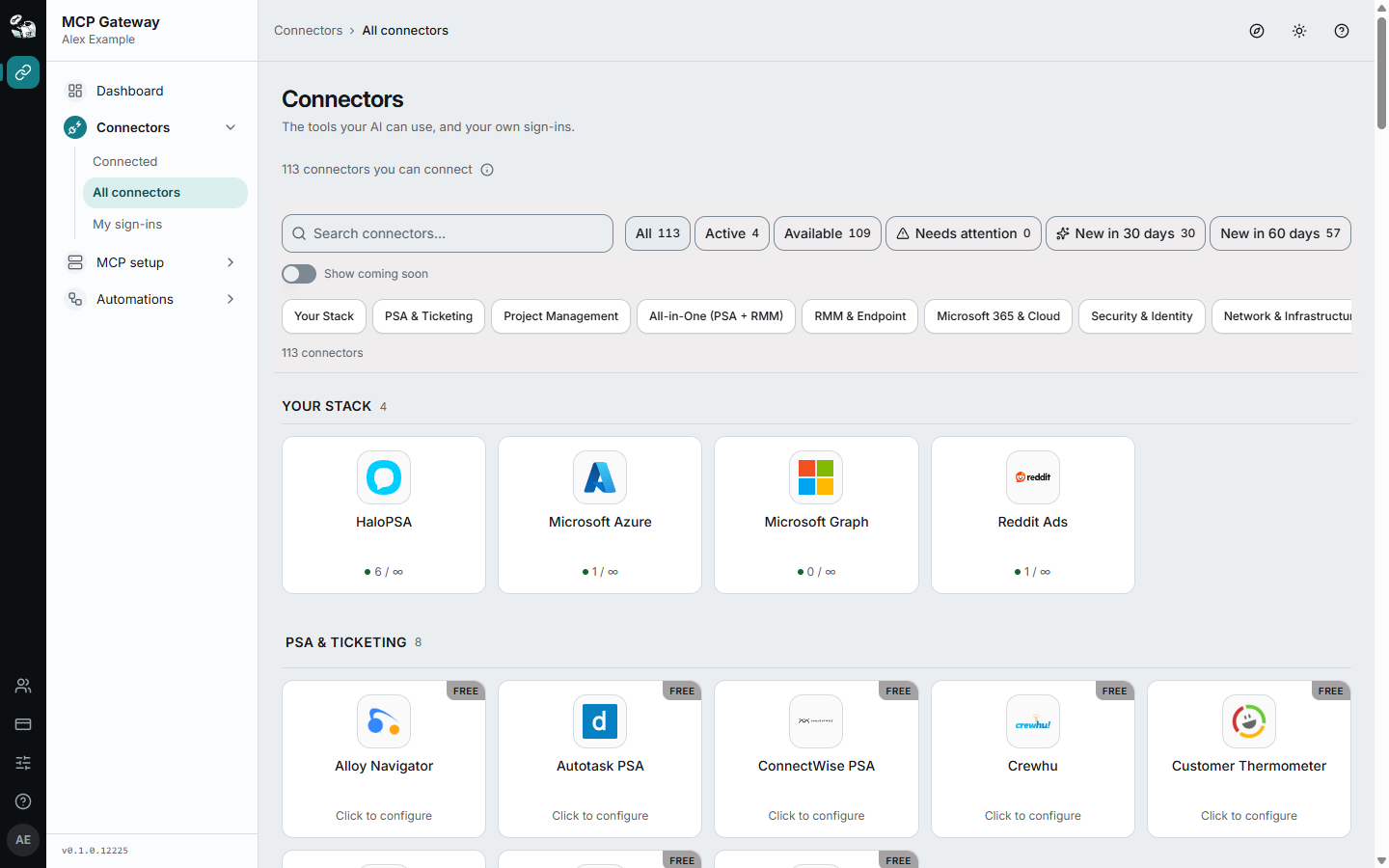
The Connectors page, All connectors view: search, status chips (All, Active, Available, Needs attention, New in 30 days, New in 60 days), category chips, the Your Stack section and PSA & Ticketing cards marked "Click to configure".
The current categorized connector catalog. Real usage counts are retained to show how active and available cards differ; identity-bearing navigation is excluded from the capture.

The filter chips above the cards narrow the list: All, Active (in your stack), Available (not in your stack yet), Needs attention, and New in 30 days / New in 60 days, which show only the connectors added to StackJack in that period. A connector that is still Coming Soon never shows under the two "New" chips.

Who can manage connectors

Connector management is role-gated:

CapabilityOwner / Co-owner / AdministratorMember
View the Connectors pageYesYes — members see their Your personal sign-ins section on the same page
Configure, update, disconnect, re-test, re-enableYesNo
Upgrade or cancel a connector planYesNo
Connect their own per-user sign-in (supported connectors)Co-owners and Administrators: yes, in the Your personal sign-ins section of the Connectors page. Only the primary owner has no personal section — when they authorize an OAuth connector on Connectors, that shared connection is made under their own vendor sign-inYes — in their Your personal sign-ins section

The life of a connector

A connector moves through a simple lifecycle, each stage covered by a chapter in this section:

  1. Activate — configure credentials and get a plan for the connector (Activating a Connector).
  2. Connect — walk through the setup guide and configure dialog (Connecting a Connector); StackJack validates the credentials at save (Validation at Save).
  3. Stay healthy — StackJack continuously re-checks credentials in the background and tells you when something breaks (Connector Health & Auto-Disable).
  4. Maintain — rotate credentials when needed (Updating & Rotating Credentials).
  5. Disconnect — remove the credentials when you no longer need the connector (Disconnecting a Connector).