Connector guides

Connect Action1

Action1 is a cloud-native patch management, vulnerability scanning, and endpoint automation platform. Connecting it to StackJack lets your AI assistant work with your Action1 enterprise through MCP…

Written By Christopher Scaminaci

Last updated About 22 hours ago

Action1 is a cloud-native patch management, vulnerability scanning, and endpoint automation platform. Connecting it to StackJack lets your AI assistant work with your Action1 enterprise through MCP tools — the standardized tool calls (Model Context Protocol) that AI harnesses like Claude or ChatGPT use to act on your behalf. Once connected, your AI can list endpoints, review vulnerabilities and patch status, inspect automations, and (on paid plans) run write operations such as managing automation schedules and deploying agents.

The Action1 tool family uses the action1_ prefix. Read and reporting tools are available on the Free plan; write tools (including automation management) and composite analytics tools (fleet-wide summaries and rollups) require a Pro or Business plan for the Action1 connector. See the generated Action1 tool reference for the current inventory, input schemas, plan tiers, and safety notes.

Before you begin

You will need:

  • A StackJack role that can manage connectors: tenant Owner, co-owner, or Administrator. Plain Members cannot add or edit connector credentials.
  • Permission to manage Users & API Credentials and assign Action1 roles.
  • To know which region your Action1 account is hosted in: US (app.action1.com), EU (app.eu.action1.com), or AU (app.au.action1.com). Check the address bar when you log in to Action1 — the credentials you create only work against their home region.

Action1 API credentials are non-interactive identities, separate from human user accounts. Assign the credential a least-privilege role when you create it; you can assign additional roles later if your StackJack workflows need them.

Step 1: Create API credentials in Action1

  1. Log in to the Action1 console as an administrator, in your home region.
  2. Go to Configuration > Users & API Credentials.
  3. Click + New API Credentials, enter a recognizable name, and select the least-privilege role that covers the tools you intend to enable. Action1 lets you assign additional roles later.
  4. Action1 generates two values:
    • a Client ID in email format (it looks like api-key-...@action1.com — this is normal, it is an identifier, not a mailbox), and
    • a Client Secret.
  5. Copy both values immediately. The secret is not shown after the pop-up closes — if you lose it, create new credentials.

Step 2: Add the credentials in StackJack

  1. In the StackJack portal, go to Connectors.
  2. Find the Action1 card. Click How To Connect if you want the guided walkthrough of Step 1, or go straight to Configure.
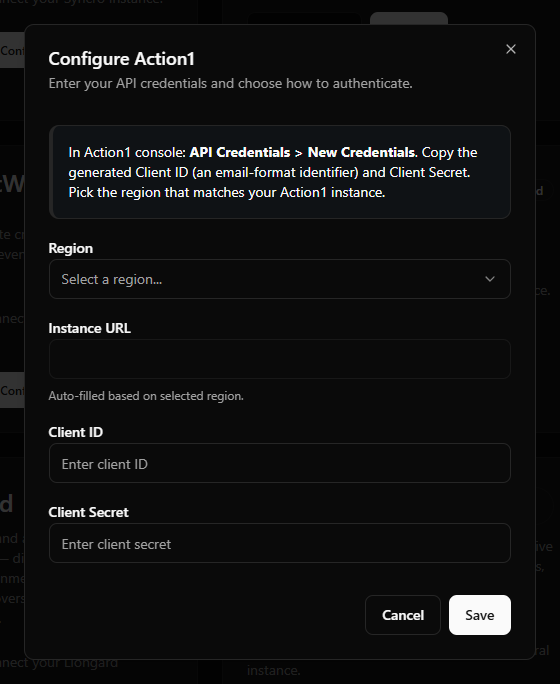
  3. In the configuration dialog:
FieldWhat to enter
RegionUS, EU, or AU — must match where your Action1 account lives.
Instance URLFilled in automatically from the region you pick; you cannot edit it.
Client IDThe email-format identifier from Action1 (e.g. api-key-...@action1.com).
Client SecretThe secret generated alongside it.
  1. Click Save.

Action1 setup-field example showing the region dropdown, auto-filled Instance URL, and Client ID / Client Secret fields.
Field-layout example from the earlier centered setup shell. The current Portal presents these fields in the connector's right-side drawer.

What happens when you save

  • Your credentials are stored encrypted in Azure Key Vault — they are never written to the StackJack database.
  • StackJack immediately tests the credentials against Action1. If the test fails, your credentials are still saved and you'll see a "saved, but validation failed" message with the reason so you can correct it.
  • A Free subscription for the Action1 connector is created automatically, so the Free-tier tools appear in your AI harness right away. Upgrade from the connector card whenever you're ready — current pricing is shown in the portal at checkout.

Ongoing token handling — nothing for you to do

Action1 uses short-lived access tokens (about an hour) with rotating refresh tokens behind the scenes. StackJack refreshes these automatically and safely in the background — you never re-enter credentials unless you revoke or regenerate them inside Action1.

Health monitoring

StackJack periodically re-validates the connection. If it fails definitively three times in a row (for example, because the credentials were revoked in Action1), the connector is automatically disabled and the tenant owner is emailed. The connector card then shows the error details along with Re-enable and Update Credentials buttons. (A card that is failing validation but not yet disabled shows a Re-test button instead.)

What your AI can do once connected

  • Free plan: read and reporting tools — list organizations, endpoints, endpoint groups, installed software, updates, vulnerabilities, automations, scripts, reports, and the audit trail.
  • Pro / Business plans: everything in Free, plus write tools (create/update/delete automation schedules, apply automations, manage deployment settings and deployers, and more) and composite analytics tools such as vulnerability summaries, patch-compliance rollups, and endpoint health rollups.
  • Business includes the same tool set as Pro; higher plans mainly raise your monthly usage allowance.

Two usage notes worth passing to whoever drives the AI:

  • Organizations first. Action1 supports multiple organizations inside one enterprise, and almost every operational tool needs an organization ID. The AI should call action1_list_organizations first to discover them.
  • Usage caps. Each connector subscription has a monthly tool-call allowance. The connector card, Dashboard, and checkout show the current allowance for your plan. There is no separate per-minute StackJack burst limit on MCP calls; the monthly allowance is the StackJack-side enforcement point.

Rate limits toward Action1

Action1 does not publish an API rate limit, so StackJack conservatively paces outbound requests to Action1 at 60 requests per minute per tenant. Heavy multi-step AI sessions are slowed by that pacing, which keeps an AI session from flooding your Action1 enterprise. Pacing is not a guarantee: retries are bounded, so a wide enough read can still come back throttled or time out. Narrow the read, honour any retry delay the vendor sends, and check whether a write landed before repeating it — see Retrying a failed or timed-out write.

Troubleshooting

SymptomLikely cause and fix
Validation fails right after savingRegion mismatch (credentials created in EU but US selected, or vice versa), or a typo in the Client ID/Secret. Re-check the region and re-paste both values.
Tools return permission errorsThe API credential's assigned roles do not include the required permission or organization scope. Adjust the credential's role assignments under Configuration > Users & API Credentials.
Connector shows DisabledThree consecutive validation failures — usually revoked or regenerated credentials. Create fresh credentials in Action1, click Update Credentials on the card to save them, then Re-enable.
A tool asks for an organization IDExpected — run action1_list_organizations to discover the IDs first.

Per-user access

Action1 does not support per-user sign-in through StackJack — the connector uses one shared API-credential identity for the whole tenant, and all tool calls run under that credential's assigned roles. See Shared vs. per-user credentials for the current list of connectors that support personal attribution.

Disconnecting

Disconnect on the Action1 card deletes the stored credentials from Key Vault, and Action1 calls on that connection stop working immediately. Where the card holds several connections, the others keep working and the connector stays connected until you remove the last one.

Whether Action1's tools disappear from your AI's tool list is a separate choice rather than an automatic consequence. On the last connection of a Free connector the dialog offers to remove them, with the box selected by default. On a paid connector the tools stay listed and billing continues: disconnecting does not cancel a paid Action1 subscription. The plan controls only appear while the connector is connected, so end the plan before disconnecting. On a paid connector that button reads Manage on Billing and opens this connector's removal dialog on the Billing page; a legacy website subscription still reads Cancel Plan. If you've already disconnected, save your credentials again to bring the plan controls back, then end the plan. See Disconnecting a Connector for what else a removal reaches.

Action1 tools

action1_ · 144 tools · Free 73 · Pro 71

Organizations

ToolWhat it does
action1_create_organization
Pro · Write
Create a new organization within the Action1 enterprise.
action1_delete_organization
Pro · Destructive
Permanently delete an organization.
action1_list_organizations
Free · Read-only
List organizations within the current Action1 enterprise.
action1_update_organization
Pro · Write
Update properties on an existing organization.

Enterprise

ToolWhat it does
action1_get_enterprise
Free · Read-only
Retrieve metadata about the current Action1 enterprise (the root tenant that contains all organizations).
action1_request_enterprise_closure
Pro · Destructive
Request closure (deletion) of the entire Action1 enterprise.
action1_revoke_enterprise_closure
Pro · Write
Cancel a previously requested enterprise closure during the grace window.
action1_update_enterprise
Pro · Write
Update enterprise-level settings.

Users

ToolWhat it does
action1_create_user
Pro · Write
Create a new user.
action1_delete_user
Pro · Destructive
Permanently delete a user from the enterprise.
action1_get_me
Free · Read-only
Retrieve the profile of the currently authenticated user (the API credential's owning user).
action1_get_user
Free · Read-only
Retrieve a single user by ID.
action1_list_user_roles
Free · Read-only
List the roles assigned to a specific user.
action1_list_users
Free · Read-only
List all users in the enterprise (interactive admins, SSO users, and API service accounts).
action1_update_me
Pro · Write
Update settings on the currently authenticated user.
action1_update_user
Pro · Write
Update an existing user's properties.

Roles & Permissions

ToolWhat it does
action1_assign_user_to_role
Pro · Write
Assign a user to a role.
action1_clone_role
Pro · Write
Clone an existing role into a new role with the same permission set.
action1_create_role
Pro · Write
Create a new role.
action1_delete_role
Pro · Destructive
Permanently delete a role.
action1_get_role
Free · Read-only
Retrieve a single role by ID, including its full permission set.
action1_list_permission_templates
Free · Read-only
List the available permission templates Action1 ships with.
action1_list_role_users
Free · Read-only
List every user assigned to a given role.
action1_list_roles
Free · Read-only
List all roles defined in the enterprise.
action1_unassign_user_from_role
Pro · Destructive
Remove a user's assignment to a role.
action1_update_role
Pro · Write
Update properties on an existing role (name, description, permission set).

Endpoints

ToolWhat it does
action1_delete_endpoint
Pro · Destructive
Permanently remove an endpoint from the organization and uninstall its agent.
action1_get_agent_installation_url
Free · Read-only
Returns a download URL for the Action1 agent installer for the specified organization.
action1_get_endpoint
Free · Read-only
Get full details for a single endpoint including hardware, OS, agent version, custom fields, and group membership.
action1_get_endpoints_status
Free · Read-only
Returns 'Yes'/'No' indicating whether any endpoints are deployed in the org.
action1_list_endpoint_missing_updates
Free · Read-only
List all missing OS and third-party software updates for a single endpoint with offset-based pagination.
action1_list_endpoints
Free · Read-only
List all endpoints (managed devices) in the organization with offset-based pagination.
action1_move_endpoint
Pro · Destructive
Move an endpoint from its current organization to another organization in the same enterprise.
action1_update_endpoint
Pro · Write
Update mutable endpoint properties.

Endpoint Groups

ToolWhat it does
action1_create_endpoint_group
Pro · Write
Create a new endpoint group in the organization.
action1_delete_endpoint_group
Pro · Destructive
Permanently delete an endpoint group.
action1_get_endpoint_group
Free · Read-only
Get full details for a single endpoint group including name, description, membership rules, and metadata.
action1_list_endpoint_groups
Free · Read-only
List all endpoint groups (logical collections of endpoints) in the organization with offset-based pagination.
action1_list_group_endpoints
Free · Read-only
List all endpoints that are members of a specific group with offset-based pagination.
action1_modify_group_endpoints
Pro · Destructive
Add or remove endpoint members from a group.
action1_update_endpoint_group
Pro · Write
Update endpoint group properties (name, description, filters).

Remote Sessions

ToolWhat it does
action1_get_remote_session
Free · Read-only
Get the current state of an active remote session including status (connected field is "yes"/"no"), connected user, monitor_count for multi-display endpoints, and connection metadata.
action1_start_remote_session
Pro · Destructive
Starts a new browser-based remote-assist session to the endpoint (not RDP).
action1_switch_remote_session_monitor
Pro · Write
Switches the active monitor on a multi-display endpoint during an active remote session.

Agent Deployment

ToolWhat it does
action1_delete_deployer
Pro · Destructive
Permanently remove a Deployer service registration from the organization.
action1_get_agent_deployment_settings
Free · Read-only
Get the agent deployment settings for the organization, including auto-discovery, network scan ranges, credentials, and deployer behavior.
action1_get_deployer
Free · Read-only
Get full details for a single Deployer service including host machine, version, status, last contact timestamp, and discovered network ranges.
action1_get_deployer_installation_url
Free · Read-only
Returns a JSON object containing the download URL for the Action1 Deployer Windows EXE installer for the org.
action1_list_deployers
Free · Read-only
List all installed Deployer services for the organization with offset-based pagination.
action1_uninstall_deployer
Pro · Destructive
Initiate uninstall of an Action1 Deployer service from the Windows host.
action1_update_agent_deployment_settings
Pro · Write
Update the org's Agent Deployment configuration.

Data Sources

ToolWhat it does
action1_create_data_source
Pro · Write
Create a new custom data source (a scripting template that queries endpoint data).
action1_delete_data_source
Pro · Destructive
Permanently delete a custom data source.
action1_get_data_source
Free · Read-only
Get the full definition of a single data source including the script body, output column schema, and built-in/custom flag.
action1_list_data_sources
Free · Read-only
Lists scripting templates that query endpoint data (built-in + custom).
action1_update_data_source
Pro · Write
Update an existing custom data source's script, schema, or metadata.

Scripts

ToolWhat it does
action1_create_script
Pro · Write
Create a new custom executable script.
action1_delete_script
Pro · Destructive
Permanently delete a custom script.
action1_get_script
Free · Read-only
Get the full definition of a single script including its language, body, derived parameter list, and built-in/custom flag.
action1_list_scripts
Free · Read-only
Lists ready-to-use PowerShell/CMD/Bash scripts (built-in + custom).
action1_update_script
Pro · Write
Update an existing custom script's body or metadata.

Settings

ToolWhat it does
action1_create_setting
Pro · Write
Create a new setting value bound to a template at a given scope.
action1_delete_setting
Pro · Destructive
Permanently delete a setting.
action1_get_setting
Free · Read-only
Get a single setting's full detail including the template reference, scope, and current value.
action1_get_setting_template
Free · Read-only
Get the full definition of a setting template including the value schema and supported scopes.
action1_list_setting_templates
Free · Read-only
Templates that drive what kinds of settings can be created.
action1_list_settings
Free · Read-only
List all configured settings (template + applied value at a given scope).
action1_update_setting
Pro · Write
Update the value of an existing setting.

Report Definitions

ToolWhat it does
action1_create_custom_report
Pro · Write
Create a new custom report definition.
action1_delete_custom_report
Pro · Destructive
Permanently delete a custom report definition.
action1_get_reports_in_category
Free · Read-only
Returns the children of a category, or the resolved-detail of a report when given a report ID.
action1_list_reports
Free · Read-only
Lists report definitions (built-in + custom).
action1_update_custom_report
Pro · Write
Update a custom report's columns, filters, or metadata via PATCH semantics.

Report Data

ToolWhat it does
action1_drilldown_report_row
Free · Read-only
Drill into a single report row to retrieve its underlying detail records (e.g. expand an aggregate row into the per-endpoint detail it summarises).
action1_export_report
Free · Read-only
Export an Action1 report to CSV or HTML.
action1_export_report_row_details
Free · Read-only
Export the drilled-down details for a single report row to CSV or HTML.
action1_get_report_data
Free · Read-only
Fetch the data rows produced by a previously generated report for a specific organization.
action1_get_report_errors
Free · Read-only
List per-endpoint or per-row errors that occurred while a report was being generated for an organization.
action1_requery_report
Pro · Write
Triggers async report re-fetch.

Software Repository

ToolWhat it does
action1_check_package_match_conflicts
Free · Read-only
Pre-flight check: ask Action1 whether a proposed `app_name_match` regex would collide with another package's version (i.e. would two different versions match the same installed software on the endpoint).
action1_check_package_version_match_conflicts
Free · Read-only
Pre-flight check: ask Action1 whether a proposed `app_name_match` regex would collide with another version of the SAME package.
action1_clone_software_package
Pro · Write
Duplicate an existing package and all its versions into a new custom package.
action1_create_package_version
Pro · Write
Add a new version (with install/uninstall actions) to an existing software package.
action1_create_software_package
Pro · Write
Register a new software package shell in the org's repository.
action1_delete_package_version
Pro · Destructive
Permanently delete a specific version from a software package.
action1_delete_software_package
Pro · Destructive
Permanently delete a software package and ALL of its versions/actions from the org's repository.
action1_delete_version_action
Pro · Destructive
Permanently delete a single additional action (install / uninstall / detection step) from a CUSTOM package version while keeping the version itself.
action1_get_package_version
Free · Read-only
Get full detail for a specific version of a software package, including its install / uninstall / detection actions.
action1_get_software_package
Free · Read-only
Get full detail for a single software package.
action1_list_software_packages
Free · Read-only
Lists packages registered in the org's repository (vendor, product name, latest version, package type).
action1_update_package_version
Pro · Write
Update a specific version of a software package (e.g. tweak install command line or detection rule).
action1_update_software_package
Pro · Write
Update properties on an existing CUSTOM software package (rename, description, internal_notes).

Updates / Patches

ToolWhat it does
action1_list_endpoints_missing_update
Free · Read-only
For a specific package version, list every endpoint that is currently missing it.
action1_list_missing_updates
Free · Read-only
List patches/updates currently missing across endpoints in an organization.
action1_list_package_updates
Free · Read-only
List the available update versions for a specific package across the organization.

Installed Software

ToolWhat it does
action1_get_endpoint_installed_software
Free · Read-only
List the installed software inventory for a single endpoint (vendor, product, version, install date).
action1_get_installed_software_errors
Free · Read-only
Returns the per-endpoint errors encountered during installed-software collection.
action1_list_installed_software
Free · Read-only
List all installed software titles aggregated across the org's endpoints, with install counts.
action1_requery_endpoint_installed_software
Pro · Write
Trigger an asynchronous re-scan of installed software for a single endpoint.
action1_requery_installed_software
Pro · Write
Trigger an asynchronous re-scan of installed software across all endpoints in the org.

Action Templates

ToolWhat it does
action1_get_action_template
Free · Read-only
Retrieve a single action template by ID.
action1_list_action_templates
Free · Read-only
List the available action templates (the reusable building blocks Action1 uses for automations, e.g. install package, run script, reboot).

Automations

ToolWhat it does
action1_apply_automation
Pro · Destructive
Trigger a one-shot automation run.
action1_create_automation_schedule
Pro · Destructive
Create a scheduled automation (one or more actions executed on a schedule against a scope of endpoints).
action1_delete_automation_action
Pro · Destructive
Remove a specific action from a schedule without deleting the entire schedule.
action1_delete_automation_schedule
Pro · Destructive
Hard-delete an automation schedule.
action1_get_automation_deployment_statuses
Free · Read-only
Get the deployment statuses (per-target endpoint) for an automation schedule.
action1_get_automation_endpoint_details
Free · Read-only
Get full execution detail for a single endpoint within an automation instance (logs, exit codes, timing).
action1_get_automation_instance
Free · Read-only
Get details of a specific automation instance (run).
action1_get_automation_schedule
Free · Read-only
Get a single automation schedule by ID.
action1_list_automation_instances
Free · Read-only
List automation instances (one row per execution of a schedule).
action1_list_automation_results
Free · Read-only
List per-endpoint results for an automation instance.
action1_list_automation_schedules
Free · Read-only
List automation schedules within an organization.
action1_stop_automation
Pro · Destructive
Stop a running automation instance.
action1_update_automation_schedule
Pro · Destructive
Update a scheduled automation.

Vulnerabilities & CVEs

ToolWhat it does
action1_create_vulnerability_remediation
Pro · Destructive
Document a compensating control for a CVE in an organization.
action1_delete_vulnerability_remediation
Pro · Destructive
Delete a remediation record.
action1_get_cve_description
Free · Read-only
Get the global description of a CVE (not org-scoped).
action1_get_vulnerability
Free · Read-only
Get detailed information for a specific vulnerability within an organization, including affected products and remediation history.
action1_list_vulnerabilities
Free · Read-only
List vulnerable software detected on endpoints in an organization.
action1_list_vulnerability_endpoints
Free · Read-only
List endpoints affected by a specific CVE within an organization.
action1_list_vulnerability_remediations
Free · Read-only
List recorded remediation/compensating-control actions for a specific CVE.
action1_update_vulnerability_remediation
Pro · Destructive
Update an existing remediation record.

Audit Trail

ToolWhat it does
action1_export_audit_trail
Free · Read-only
Export the audit trail as CSV.
action1_get_audit_event
Free · Read-only
Retrieve full details for a single audit event including before/after values where applicable.
action1_list_audit_events
Free · Read-only
List audit trail entries (admin actions, logins, API calls, etc.).

Subscription & Usage

ToolWhat it does
action1_get_enterprise_subscription
Free · Read-only
Get current Action1 license/subscription details for the enterprise (plan, seat counts, expiration).
action1_get_enterprise_usage
Free · Read-only
Get usage statistics for the entire enterprise (cross-organization rollup of agents, automations, etc).
action1_get_organization_usage
Free · Read-only
Get usage statistics for a single organization.
action1_get_organizations_usage
Free · Read-only
Get usage statistics broken out per organization.
action1_request_quote
Pro · Destructive
Request a price quote for an Action1 plan.
action1_request_trial
Pro · Destructive
Request a free trial or trial extension.

Report Subscriptions

ToolWhat it does
action1_create_report_subscription
Pro · Write
Create a new email report subscription.
action1_delete_report_subscription
Pro · Destructive
Cancel a scheduled report subscription.
action1_list_report_subscriptions
Free · Read-only
List the current user's scheduled email-report subscriptions.
action1_update_report_subscription
Pro · Write
Update an existing email report subscription.
ToolWhat it does
action1_search
Free · Read-only
Universal case-insensitive substring search across multiple resource types (reports, endpoints, and App Store applications) within a specific organization.

Diagnostics

ToolWhat it does
action1_get_diagnostic_logs
Free · Read-only
Retrieve diagnostic log entries for a specific organization.

Analytics

ToolWhat it does
action1_automation_success_rate
Pro · Read-only
Combines automation instances with their endpoint results to compute success vs failure rate per organization.
action1_endpoint_health_rollup
Pro · Read-only
Combines endpoints, missing updates, and vulnerabilities into a single org-level health snapshot.
action1_patch_compliance_summary
Pro · Read-only
Combines endpoint inventory and missing-updates data for a single organization to show patch posture (% endpoints up to date, top missing patches).
action1_software_inventory_rollup
Pro · Read-only
Cross-organization installed-software rollup.
action1_summarize_vulnerabilities
Pro · Read-only
Cross-organization rollup of vulnerabilities.
action1_top_vulnerable_endpoints
Pro · Read-only
Cross-organization ranking of vulnerabilities.