Connector guides

Connect IT Glue

IT Glue is Kaseya's IT documentation platform — passwords, device configurations, flexible assets, and SOPs. Connecting IT Glue to StackJack lets your AI assistant read and update that documentation…

Written By Christopher Scaminaci

Last updated 6 days ago

IT Glue is Kaseya's IT documentation platform — passwords, device configurations, flexible assets, and SOPs. Connecting IT Glue to StackJack lets your AI assistant read and update that documentation through MCP tools (MCP is the Model Context Protocol, the open standard AI assistants use to call external tools).

Once connected, your AI can work with organizations, configurations, flexible assets, passwords, documents, contacts, checklists, attachments, and export jobs through tools with the itg_ prefix (for example itg_list_organizations). See the generated IT Glue tool reference for the current inventory, input schemas, plan tiers, and safety notes.

Before you begin

You'll need:

  • A StackJack role that can manage connectors: Owner, co-owner, or Administrator.
  • An IT Glue Administrator role and an account where the Custom API Keys feature is available (Kaseya currently documents it for Enterprise plans).
  • To know which IT Glue region your account is hosted in: US, EU, or AU. If you're unsure, check the URL you use to sign in to IT Glue or ask Kaseya support.

The same steps below are also shown inside the portal — open Connectors, find the IT Glue card, and click How To Connect.

Step 1 — Generate an API key in IT Glue

  1. Sign in to IT Glue as an administrator.
  2. Go to Admin > Settings > Custom API Keys.
  3. Click Create API Key and give it a descriptive name (for example, "StackJack Integration").
  4. If you want StackJack to read and write passwords, enable the Password Access toggle on the key. This is a separate toggle from regular API access — without it, every password tool is blocked (see Password Access below).
  5. Copy the key immediately. IT Glue shows the key exactly once and cannot retrieve it later.

⚠ IT Glue automatically revokes API keys that go unused for 90 days. If that happens, StackJack will start showing validation failures for this connector — generate a new key and save it again.

Step 2 — Connect in StackJack

  1. In the StackJack portal, open Connectors from the sidebar.
  2. Find the IT Glue card and click Configure (or How To Connect first if you want the in-portal walkthrough).
  3. Fill in the form:
FieldWhat to enter
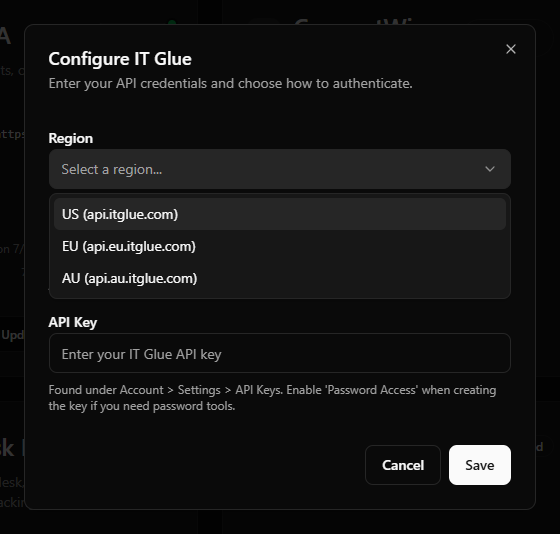
RegionSelect US (api.itglue.com), EU (api.eu.itglue.com), or AU (api.au.itglue.com).
Instance URLAuto-filled from your region selection — you can't edit it directly.
API KeyPaste the key you generated in Step 1.
  1. Click Save.

IT Glue credential-field example with the Region dropdown open showing US/EU/AU options and the API Key field filled with a masked value.
Field-layout example from the earlier centered setup shell. The current Portal presents these fields in the connector's right-side drawer.

What happens when you save

  • Your API key is stored encrypted in a secure vault — it is never stored in StackJack's database and never shown again in the portal.
  • A Free plan for IT Glue is activated automatically, so your AI can start calling IT Glue tools right away.
  • StackJack immediately runs a live validation call against IT Glue. If validation fails, your credentials are still saved — fix the underlying issue (wrong region, revoked key, etc.) and click Re-test on the card.

Password Access

IT Glue treats password data as a separate capability:

  • If your API key was created without Password Access, all itg_ password tools return a clear error explaining that the capability isn't enabled, with guidance on how to fix it. Everything else keeps working.
  • Password Access is configured per key. If your current IT Glue UI does not offer that setting on the existing key, create a replacement with Password Access enabled and then update StackJack.
  • StackJack checks whether your key has Password Access every time it validates the connector and caches the answer for up to an hour. Re-saving the connector triggers a fresh validation, so after switching to a Password-Access key, save the new key and password tools work immediately.

Permissions your key grants

IT Glue custom API keys are account-scoped credentials created by an Administrator; they are not delegated sessions that inherit a narrower human user's role. Treat a key as broad access to the account's API data. Password Access is the separate per-key control for returning password values. The connected key can reach these areas of the IT Glue API:

AreaAccess
OrganizationsOrganizations, Locations, Contacts (read/write)
ConfigurationsConfigurations, Interfaces, Domains (read/write)
PasswordsPasswords, Password Folders (read/write — requires Password Access)
DocumentsDocuments, Sections, Images (read/write)
Flexible AssetsTypes, Fields, Instances (read/write)
ChecklistsChecklists (read/update/delete — IT Glue has no create API)
AttachmentsAttachments and related items (read/write)
DiscoveryExpirations, Logs (30-day window), User Metrics (read)
DirectoryUsers, Groups (read/write)
ExportsAsync export jobs (read/write)
ReferenceCountries, Regions, Manufacturers, Models, Types (read/write)

To see exactly which tools use which permissions — and to scope an AI client to a smaller tool set — open Permissions in the portal and select IT Glue.

Plans, tools, and usage limits

  • The IT Glue tool family is split across plan tiers: the Free plan includes the core read/browse tools, and the Pro plan unlocks the larger write/management surface. Upgrade from the IT Glue card on the Connectors page — current pricing is shown in the portal and at checkout.
  • Each plan includes a monthly tool-call allowance; the usage bar on the connector card tracks it through your billing cycle. StackJack applies no per-minute rate limit of its own — the monthly allowance is the only StackJack-side cap.
  • Separately, StackJack paces its requests to IT Glue to respect IT Glue's own API limit of 3,000 requests per 5 minutes. That reduces throttling rather than removing it: the limit belongs to your IT Glue account, so anything else using the same key draws on it too, and a wide enough read can still be throttled. Narrow the read, honour any retry delay IT Glue sends, and check whether a write landed before repeating it — see Retrying a failed or timed-out write.
  • List endpoints return 50 objects per page by default and accept up to 1,000. Attachments and other request payloads are subject to IT Glue's 10 MB API payload limit.

Pausing a key

On supported Enterprise accounts, an IT Glue Administrator can Pause a key from Admin > Settings > API Keys, temporarily blocking authentication without deleting the key, and Activate it later. Pause and Activate actions are written to IT Glue's audit log. Coordinate a pause with StackJack: validation and tools fail while the key is paused and recover after it is activated and re-tested.

Troubleshooting

SymptomLikely cause and fix
"Saved but validation failed" messageCredentials were stored but the live check failed. Verify the region matches where your account is hosted and that the key wasn't revoked, then click Re-test on the card.
Password tools return a "capability not enabled" errorYour key lacks Password Access. Create a new key with the toggle enabled and update the connector.
Connector suddenly shows as disabledThree consecutive failed background checks auto-disable a connector, and the account owner is emailed. A common cause is IT Glue's 90-day auto-revoke of unused keys. Generate a new key, click Update Credentials on the card to save it, then Re-enable.
Individual tools return 403The key is invalid/paused, Password Access is off for a password request, or IT Glue rejected that resource/action. Check the key status and Password Access under Admin > Settings > API Keys, then review the vendor response on the StackJack card.

Disconnecting

On the IT Glue card, click Disconnect and confirm. This deletes your stored credentials and stops all IT Glue tool calls.

⚠ Disconnecting does not cancel a paid IT Glue plan — billing continues until you cancel it separately. The plan controls only appear while the connector is connected, so end the plan before disconnecting. On a paid connector that button reads Manage on Billing and opens this connector's removal dialog on the Billing page; a legacy website subscription still reads Cancel Plan. If you've already disconnected, save your credentials again to bring the plan controls back, then end the plan.

IT Glue tools

itg_ · 149 tools · Free 65 · Pro 84

Organizations & Locations

ToolWhat it does
itg_bulk_delete_locations
Pro · Destructive
Bulk-delete multiple locations by ID.
itg_bulk_delete_organizations
Pro · Destructive
Bulk-delete multiple organizations by ID.
itg_bulk_update_locations
Pro · Write
Bulk-update multiple locations in a single request.
itg_bulk_update_organizations
Pro · Write
Bulk-update multiple organizations in a single request.
itg_create_location
Pro · Write
Create a new location.
itg_create_organization
Pro · Write
Create a new organization.
itg_get_location
Free · Read-only
Retrieve full details for a single location by ID.
itg_get_organization
Free · Read-only
Retrieve full details for a single organization by ID.
itg_list_locations
Free · Read-only
List locations (physical sites).
itg_list_organizations
Free · Read-only
List organizations (companies/clients).
itg_update_location
Pro · Write
Update an existing location (PATCH semantics — only provided fields are updated).
itg_update_organization
Pro · Write
Update an existing organization.

Contacts

ToolWhat it does
itg_bulk_delete_contacts
Pro · Destructive
Bulk-delete multiple contacts by ID.
itg_bulk_update_contacts
Pro · Write
Bulk-update multiple contacts in a single request.
itg_create_contact
Pro · Write
Create a new contact.
itg_get_contact
Free · Read-only
Retrieve full details for a single contact by ID.
itg_list_contacts
Free · Read-only
List contacts (people attached to organizations).
itg_update_contact
Pro · Write
Update an existing contact (PATCH semantics — only provided fields are updated).

Configurations & Network

ToolWhat it does
itg_bulk_delete_configurations
Pro · Destructive
Bulk-delete multiple configurations by ID.
itg_bulk_update_configuration_interfaces
Pro · Write
Bulk-update multiple configuration interfaces in a single request.
itg_bulk_update_configurations
Pro · Write
Bulk-update multiple configurations in a single request.
itg_create_configuration
Pro · Write
Create a new configuration (CI).
itg_create_configuration_interface
Pro · Write
Create a new interface (IP/MAC/VLAN) for a configuration.
itg_delete_configuration_interface
Pro · Destructive
Permanently delete a configuration interface.
itg_get_configuration
Free · Read-only
Retrieve full details for a single configuration by ID.
itg_get_configuration_interface
Free · Read-only
Retrieve full details for a single configuration interface by ID.
itg_list_configuration_interfaces
Free · Read-only
List network interfaces (IPs, VLANs, MAC addresses) for a specific configuration.
itg_list_configurations
Free · Read-only
List configurations (CIs — servers, workstations, network gear, etc.).
itg_list_domains
Free · Read-only
List DNS/web domains tracked in IT Glue.
itg_update_configuration
Pro · Write
Update an existing configuration (PATCH semantics — only provided fields are updated).
itg_update_configuration_interface
Pro · Write
Update an existing configuration interface (PATCH semantics — only provided fields are updated).

Passwords & Secrets

ToolWhat it does
itg_bulk_delete_password_folders
Pro · Destructive
Bulk-delete multiple password folders under an organization.
itg_bulk_delete_passwords
Pro · Destructive
Bulk-delete multiple passwords by ID.
itg_bulk_update_password_folders
Pro · Write
Bulk-update multiple password folders.
itg_bulk_update_passwords
Pro · Write
Bulk-update multiple passwords in a single request.
itg_create_password
Pro · Write
Create a new password record.
itg_create_password_folder
Pro · Write
Create a new password folder under an organization.
itg_delete_password
Pro · Destructive
Permanently delete a single password.
itg_get_password
Free · Read-only
Retrieve full details for a single password by ID, including the plaintext value.
itg_get_password_folder
Free · Read-only
Retrieve full details for a single password folder.
itg_list_password_folders
Free · Read-only
List password folders for an organization.
itg_list_passwords
Free · Read-only
List passwords (credentials/secrets).
itg_update_password
Pro · Write
Update an existing password (PATCH semantics — only provided fields are updated).
itg_update_password_folder
Pro · Write
Update an existing password folder (PATCH semantics — only provided fields are updated).

Documents & Knowledge

ToolWhat it does
itg_bulk_delete_documents
Pro · Destructive
Bulk-delete multiple documents by ID.
itg_bulk_update_documents
Pro · Write
Bulk-update multiple documents in a single request.
itg_create_document
Pro · Write
Create a new document (KB article).
itg_create_document_section
Pro · Write
Create a new section within a document.
itg_delete_document_image
Pro · Destructive
Permanently delete a document image.
itg_delete_document_section
Pro · Destructive
Permanently delete a document section.
itg_get_document
Free · Read-only
Retrieve full details for a single document by ID, including the body content.
itg_get_document_image
Free · Read-only
Retrieve metadata for a document image by ID.
itg_get_document_section
Free · Read-only
Retrieve a single document section by ID.
itg_list_document_folders
Free · Read-only
List document folders for an organization, so folder IDs become discoverable.
itg_list_document_sections
Free · Read-only
List sections of a document.
itg_list_documents
Free · Read-only
List knowledge-base documents for an organization.
itg_publish_document
Pro · Write
Publish a draft document, making it visible in the knowledge base.
itg_update_document
Pro · Write
Update an existing document (PATCH semantics — only provided fields are updated).
itg_update_document_section
Pro · Write
Update an existing document section (PATCH semantics — only provided fields are updated).
itg_upload_document_image
Pro · Write
Upload a new image attached to a target document or organization-level gallery.

Flexible Assets

ToolWhat it does
itg_bulk_delete_flexible_assets
Pro · Destructive
Bulk-delete multiple flexible asset instances.
itg_bulk_update_flexible_asset_fields
Pro · Write
Bulk-update multiple flexible asset field definitions.
itg_bulk_update_flexible_assets
Pro · Destructive
Bulk-update multiple flexible assets in a single request.
itg_create_flexible_asset
Pro · Write
Create a new flexible asset instance.
itg_create_flexible_asset_field
Pro · Write
Create a new field on a flexible asset type.
itg_create_flexible_asset_type
Pro · Write
Create a new flexible asset type (schema).
itg_delete_flexible_asset
Pro · Destructive
Permanently delete a single flexible asset instance.
itg_delete_flexible_asset_field
Pro · Destructive
Permanently delete a flexible asset field definition.
itg_get_flexible_asset
Free · Read-only
Retrieve a single flexible asset instance by ID, including all traits (custom field values).
itg_get_flexible_asset_field
Free · Read-only
Retrieve a single flexible asset field definition by ID.
itg_get_flexible_asset_type
Free · Read-only
Retrieve a flexible asset type by ID.
itg_list_flexible_asset_fields
Free · Read-only
List field definitions for a specific flexible asset type.
itg_list_flexible_asset_types
Free · Read-only
List flexible asset types (schemas).
itg_list_flexible_assets
Free · Read-only
List flexible asset instances of a specific type.
itg_update_flexible_asset
Pro · Destructive
Update an existing flexible asset instance.
itg_update_flexible_asset_field
Pro · Write
Update an existing flexible asset field definition (PATCH semantics — only provided fields are updated).
itg_update_flexible_asset_type
Pro · Write
Update an existing flexible asset type (PATCH semantics — only provided fields are updated).

Checklists

ToolWhat it does
itg_bulk_delete_checklists
Pro · Destructive
Permanently delete up to 100 checklists in a single call.
itg_bulk_update_checklists
Pro · Write
Update up to 100 checklists in a single call.
itg_get_checklist
Free · Read-only
Retrieve full details for a single checklist by ID.
itg_list_checklists
Free · Read-only
List checklists with optional filters and pagination.
itg_update_checklist
Pro · Write
Update an existing checklist's attributes.
ToolWhat it does
itg_bulk_delete_attachments
Pro · Destructive
Permanently delete up to 100 attachments from a parent resource in a single call.
itg_bulk_delete_related_items
Pro · Destructive
Permanently delete up to 100 related items from a parent resource in a single call.
itg_create_related_item
Pro · Write
Create a related item linking the parent resource to another IT Glue resource.
itg_get_attachment
Free · Read-only
Retrieve a single attachment by ID from a parent resource.
itg_list_attachments
Free · Read-only
List attachments for a parent resource.
itg_rename_attachment
Pro · Write
Rename an attachment's display name.
itg_update_related_item
Pro · Write
Update a related item.
itg_upload_attachment
Pro · Write
Upload a new attachment to a parent resource.

Discovery & Audit

ToolWhat it does
itg_get_expiration
Free · Read-only
Retrieve full details for a single expiration event by ID.
itg_list_expirations
Free · Read-only
List expirations (upcoming and past expiry events across SSL certificates, domains, warranties, and other tracked items).
itg_list_logs
Free · Read-only
List activity/audit logs.
itg_list_user_metrics
Free · Read-only
List per-user activity metrics — logins, view counts, and engagement statistics.

Users & Groups

ToolWhat it does
itg_bulk_update_groups
Pro · Write
Update up to 100 groups in a single call.
itg_bulk_update_users
Pro · Write
Update up to 100 users in a single call.
itg_create_group
Pro · Write
Create a new user group.
itg_delete_group
Pro · Destructive
Permanently delete a user group by ID.
itg_get_group
Free · Read-only
Retrieve full details for a single group by ID.
itg_get_user
Free · Read-only
Retrieve full details for a single user by ID.
itg_list_groups
Free · Read-only
List user groups.
itg_list_users
Free · Read-only
List directory users.
itg_update_group
Pro · Write
Update an existing group's attributes.
itg_update_user
Pro · Write
Update an existing user's attributes (name, role, MFA settings, etc.).

Exports

ToolWhat it does
itg_create_export
Pro · Write
Initiate a new export job.
itg_delete_export
Pro · Destructive
Permanently delete an export job and its downloadable artifact.
itg_get_export
Free · Read-only
Retrieve a single export job by ID.
itg_list_exports
Free · Read-only
List export jobs.

Reference Data

ToolWhat it does
itg_bulk_update_models
Pro · Write
Bulk-update multiple models in a single request.
itg_create_configuration_status
Pro · Write
Create a new configuration status.
itg_create_configuration_type
Pro · Write
Create a new configuration type.
itg_create_contact_type
Pro · Write
Create a new contact type.
itg_create_manufacturer
Pro · Write
Create a new manufacturer.
itg_create_model
Pro · Write
Create a new hardware model.
itg_create_organization_status
Pro · Write
Create a new organization status.
itg_create_organization_type
Pro · Write
Create a new organization type.
itg_create_password_category
Pro · Write
Create a new password category.
itg_get_configuration_status
Free · Read-only
Retrieve a single configuration status by ID.
itg_get_configuration_type
Free · Read-only
Retrieve a single configuration type by ID.
itg_get_contact_type
Free · Read-only
Retrieve a single contact type by ID.
itg_get_country
Free · Read-only
Retrieve a single country by ID.
itg_get_manufacturer
Free · Read-only
Retrieve a single manufacturer by ID.
itg_get_model
Free · Read-only
Retrieve a single model by ID.
itg_get_operating_system
Free · Read-only
Retrieve a single operating system by ID.
itg_get_organization_status
Free · Read-only
Retrieve a single organization status by ID.
itg_get_organization_type
Free · Read-only
Retrieve a single organization type by ID.
itg_get_password_category
Free · Read-only
Retrieve a single password category by ID.
itg_get_platform
Free · Read-only
Retrieve a single platform by ID.
itg_get_region
Free · Read-only
Retrieve a single region by ID.
itg_list_configuration_statuses
Free · Read-only
List configuration statuses (e.g., Active, In Storage, Retired).
itg_list_configuration_types
Free · Read-only
List configuration types (asset categories such as Desktop, Server, Printer).
itg_list_contact_types
Free · Read-only
List contact types (e.g., IT Admin, End User, Decision Maker).
itg_list_countries
Free · Read-only
List reference countries.
itg_list_manufacturers
Free · Read-only
List hardware manufacturers.
itg_list_models
Free · Read-only
List hardware models.
itg_list_operating_systems
Free · Read-only
List operating systems.
itg_list_organization_statuses
Free · Read-only
List organization statuses (e.g., Active, Prospect, Terminated).
itg_list_organization_types
Free · Read-only
List organization types (e.g., Client, Prospect, Vendor).
itg_list_password_categories
Free · Read-only
List password categories (classifications like Admin, Service Account, End User).
itg_list_platforms
Free · Read-only
List platforms (cloud / virtualization hosts like AWS, Azure, VMware).
itg_list_regions
Free · Read-only
List reference regions (states/provinces).
itg_update_configuration_status
Pro · Write
Update an existing configuration status.
itg_update_configuration_type
Pro · Write
Update an existing configuration type.
itg_update_contact_type
Pro · Write
Update an existing contact type.
itg_update_manufacturer
Pro · Write
Update an existing manufacturer.
itg_update_model
Pro · Write
Update an existing model.
itg_update_organization_status
Pro · Write
Update an existing organization status.
itg_update_organization_type
Pro · Write
Update an existing organization type.
itg_update_password_category
Pro · Write
Update an existing password category.