Connector guides

Connect NinjaOne (NinjaRMM)

NinjaOne (formerly NinjaRMM) is a remote monitoring and management (RMM) platform for endpoint monitoring, patching, and remote access. Connecting NinjaOne to StackJack gives your AI assistant tools…

Written By Christopher Scaminaci

Last updated About 22 hours ago

NinjaOne (formerly NinjaRMM) is a remote monitoring and management (RMM) platform for endpoint monitoring, patching, and remote access. Connecting NinjaOne to StackJack gives your AI assistant tools for devices, organizations, alerts, patching, maintenance mode, scripting, and fleet analytics through StackJack's MCP endpoint. See the generated NinjaOne tool reference for the current inventory, input schemas, plan tiers, and safety notes. (MCP, the Model Context Protocol, is the open standard that lets AI assistants like Claude, ChatGPT, and Copilot call your MSP tools securely.)

NinjaOne is one of only two connectors (the other is HaloPSA) that offers a choice of two authentication methods:

MethodBest forHow it works
Authorization Code (User OAuth) — recommendedTeams that want per-user audit trailsEach team member signs in with their own NinjaOne identity. Actions your AI takes are attributable to the person who ran them.
Client CredentialsSingle shared service connectionOne app-only Client ID and Secret is shared by the whole team.

⚠ Running scripts, reaching ticket boards, adding ticket comments and creating tickets require Authorization Code (OAuth). NinjaOne treats these, and various other endpoints, as user-context operations: each one must be done by a signed-in NinjaOne technician, and NinjaOne records it under that technician's name. A Client Credentials machine token has no user context, so ninja_run_script, ticket-board tools, ninja_add_ticket_comment and ninja_create_ticket fail with a user_context_required (HTTP 403) error no matter what runAs value you pass. This is a NinjaOne rule, not a StackJack permission gap, and StackJack does not count it against your connection: the connection stays enabled and your other NinjaOne tools keep working. If you want your AI to do any of these, connect with Authorization Code (User OAuth); team members can then add their own NinjaOne sign-in (see Per-user connections) so their comments and tickets carry their own name. Read-only tools work with either method.

Before you begin

  • You need the Owner, co-owner, or Administrator role in StackJack to configure connectors. Other team members can't edit connector settings — they use the Your personal sign-ins section of the Connectors page instead (see Per-user connections below).
  • You need admin access to NinjaOne (the ability to create API applications under Administration > Apps > API).
  • Connecting a connector automatically activates it on the Free plan. You can upgrade to a paid plan at any time from the Connectors page — current pricing is shown in the portal.
  • Know your NinjaOne region. StackJack supports US (app.ninjarmm.com), US2 (us2.ninjarmm.com), EU (eu.ninjarmm.com), OC (oc.ninjarmm.com), and CA (ca.ninjarmm.com).

Tip: The same steps below are always available in-app — open Connectors, find the NinjaOne card, and click How To Connect.

Step 1: Create the OAuth application in NinjaOne

  1. In NinjaOne, go to Administration > Apps > API and create a new client application.
  2. Select Web as the Application Platform and Authorization Code as the grant type.
  3. Under Allowed Grant Types, also select Refresh Token.

⚠ Refresh Token is required. Without the Refresh Token grant, StackJack cannot maintain your connection after the initial access token expires, and you will have to re-authorize repeatedly. StackJack refuses to complete the connection if NinjaOne doesn't return a refresh token, and points you back to this setting.

  1. Set the Redirect URI to the StackJack OAuth callback URL shown in the connector setup form (you'll copy it in Step 2 — it looks like https://<your portal address>/connector-callback/ninjarmm).
  2. Select your API region and enable the required API scopes (monitoring, management).
  3. Copy the Client ID and Client Secret from the application details page.

Step 2: Authorize in StackJack

  1. In the StackJack portal, go to Connectors and click Configure on the NinjaOne card.
  2. Set Auth Method to Authorization Code (User OAuth) — Recommended (this is the default for a fresh setup).
  3. Select your Region — the Instance URL fills in automatically and can't be edited.
  4. Copy the Redirect URI shown in the dialog and make sure it is registered on your NinjaOne API application (Step 1.4) before continuing.
  5. Paste the Client ID and Client Secret.
  6. Click Authorize. You'll be redirected to NinjaOne to sign in and approve access, then returned to StackJack.

When you connect with OAuth, StackJack requests the monitoring and management scopes (plus offline access for token renewal). Scope selection checkboxes are not shown in OAuth mode — the scopes enabled on your NinjaOne application control what's actually granted.
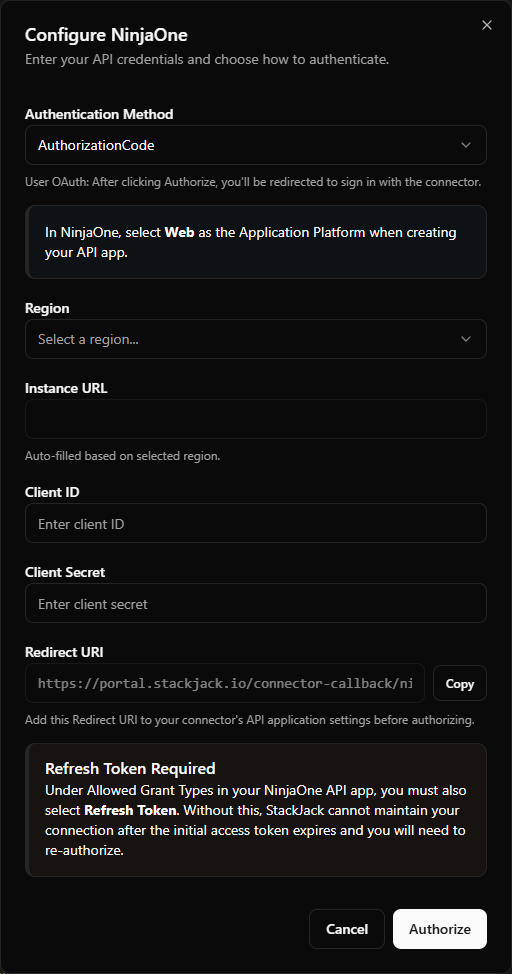
NinjaOne OAuth credential-field example — region dropdown, copyable Redirect URI row, and the "Refresh Token Required" warning alert
Credential-field example from the earlier centered layout. The current Portal presents the same setup fields in the connector's right-side drawer.

Option B: Client Credentials

Step 1: Create the API application in NinjaOne

  1. In NinjaOne, go to Administration > Apps > API and create a new client application.
  2. Select API Services as the Application Platform and Client Credentials as the grant type.

⚠ The Application Platform must be API Services for Client Credentials. (For OAuth it must be Web.) Picking the wrong platform is the most common cause of a failed connection.

  1. Enable the API scopes you want StackJack to use (see the scope guide below).
  2. Note your API region.
  3. Copy the Client ID and Client Secret from the application details page.

Step 2: Save the credentials in StackJack

  1. In the StackJack portal, go to Connectors and click Configure on the NinjaOne card.
  2. Set Auth Method to Client Credentials.
  3. Select your Region — the Instance URL fills in automatically.
  4. Paste the Client ID and Client Secret.
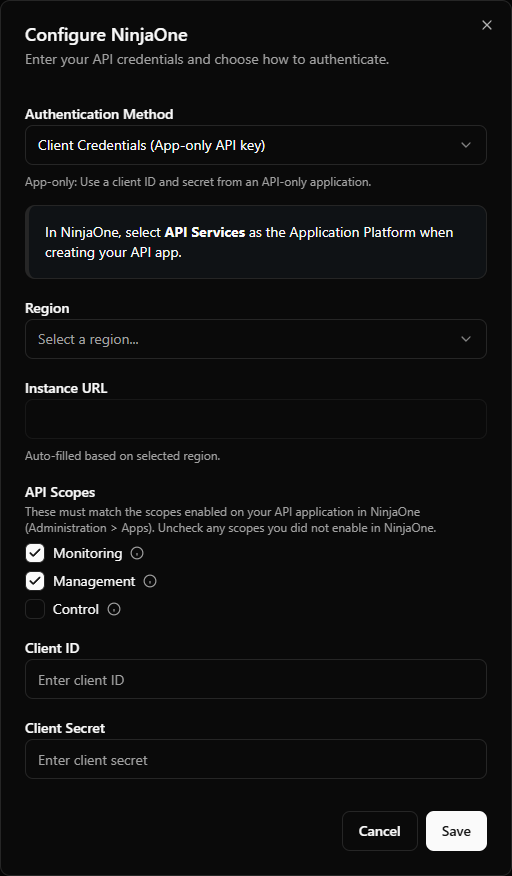
  5. Check the API Scopes boxes (Monitoring / Management / Control) to match exactly the scopes you enabled on the NinjaOne application. At least one scope is required. StackJack requests exactly the checked scopes every time it authenticates to NinjaOne, so the checkboxes must mirror the NinjaOne app: checking a scope the app does not have can make authentication fail, and unchecking a scope you do need means the tools that require it fail with permission errors (the tools themselves stay visible in StackJack).
  6. Click Save.

NinjaOne Client Credentials field example — region dropdown and the three API scope checkboxes with info tooltips
Credential-field example from the earlier centered layout. The current Portal presents these controls in the connector's right-side drawer.

NinjaOne API scopes

ScopeAccessWhat it enables in StackJack
Monitoring (recommended)Read-onlyDevices, organizations, alerts, activities, queries, knowledge-base articles, and fleet analytics dashboards
Management (recommended)Read/writeDevice reboots, patch application, maintenance mode, organization creation, policy management, and script execution
ControlRemote accessRemote control sessions — no StackJack tools currently use this scope; it's available for future use

What happens when you save

  • Your credentials are stored encrypted in Azure Key Vault. They are never stored in StackJack's database, and the portal never re-displays a saved secret.
  • StackJack immediately test-calls NinjaOne to validate the credentials. If validation fails or times out, your credentials are still saved and you'll see a warning — validation retries automatically in the background.
  • A Free plan subscription for NinjaOne is activated automatically if you don't already have one.
  • If validation keeps failing (three consecutive definitive failures), StackJack auto-disables the connection, emails the tenant owner, and shows Re-enable and Update Credentials buttons on the card.

Per-user connections for team members

With the Authorization Code method, each team member can attach their own NinjaOne identity so tool calls run as them:

  1. An admin completes the shared OAuth setup above first.
  2. The team member opens the Connectors page and selects Connect on the NinjaOne card in their Your personal sign-ins section. Members inherit the scopes from the shared setup.
  3. The member signs in to NinjaOne with their own account and approves access.
  4. On the member's first NinjaOne sign-in, StackJack then shows a one-time credentials page with a personal MCP client (ID + secret) named after the member, for use in their AI tool. The secret is displayed exactly once, and the page expires after 5 minutes — copy it immediately.
  5. When the member signs in again later — Re-authorize or Reconnect on the card — StackJack renews the sign-in and keeps the MCP client they already have. No new client is created, no credentials page is shown, and nothing changes in their AI tool. StackJack also updates that client's tool list to the member's current tools. A member who lost the secret can select Revoke my key on the card; their next sign-in then creates a new client and shows it once.

Members must have at least one NinjaOne tool assigned to them by an admin before they can connect. If a member's NinjaOne authorization later breaks (for example, a revoked refresh token), their personal sign-in card shows Re-authorize Required with a button to reconnect, and the member receives an email when re-authorizing is the fix. If NinjaOne refuses the organization's application instead (for example, its client secret changed), the card shows Administrator Action Required: an owner or administrator fixes the organization's NinjaOne connection first.

Troubleshooting

SymptomLikely cause and fix
Authorization fails with a "missing refresh token" errorThe Refresh Token grant type is not enabled on your NinjaOne API app. Enable it under Allowed Grant Types and authorize again.
Authorization or token exchange fails outrightWrong Application Platform: OAuth requires Web, Client Credentials requires API Services. Also confirm the Redirect URI registered in NinjaOne exactly matches the one shown in the StackJack dialog.
Tools return permission errorsThe scope needed by that tool isn't enabled on the NinjaOne application, or (Client Credentials mode) the checked scopes in StackJack don't match the app. Fix the NinjaOne app scopes, then re-save.
Scripts, ticket-board tools, ticket comments or new tickets return user_context_required (403)Your connector is authorized with Client Credentials, which NinjaOne won't accept for user-context endpoints (scripts, ticket boards, ticket comments, ticket creation). Reconfigure the NinjaOne connector with Authorization Code (User OAuth) and authorize again. No runAs value or retry works around this. Your credentials were not rejected, so the connection is not disabled.
Connection shows InvalidClick Re-test on the card. If the secret was rotated in NinjaOne, click Update and paste the new secret.
Card shows DisabledStackJack auto-disabled the credential after repeated failures. The card shows the exact error plus a recommended action — fix the cause, then click Re-enable (or Update Credentials first if the secret changed).
Wrong region selectedRe-open Configure, pick the correct region, and re-save (OAuth mode: re-authorize).

Disconnecting

Click Disconnect on the NinjaOne card to delete the stored credentials from Key Vault. Any AI tools using the connector stop working immediately.

⚠ Disconnecting does not cancel a paid plan — billing continues until you cancel it separately. The plan controls only appear while the connector is connected, so end the plan before disconnecting. On a paid connector that button reads Manage on Billing and opens this connector's removal dialog on the Billing page; a legacy website subscription still reads Cancel Plan. If you've already disconnected, save your credentials again to bring the plan controls back, then end the plan.

NinjaRMM tools

ninja_ · 270 tools · Free 107 · Pro 163

Organizations

ToolWhat it does
ninja_add_organization_location
Pro · Write
Add a new location to an organization.
ninja_get_organization
Free · Read-only
Get detailed information for a single organization including name, description, custom fields, and settings.
ninja_get_organization_devices
Free · Read-only
List all devices belonging to a specific organization.
ninja_get_organization_end_users
Free · Read-only
List end users belonging to an organization.
ninja_get_organization_locations
Free · Read-only
List all locations (offices/sites) for a specific organization.
ninja_list_organizations
Free · Read-only
List all organizations (clients/customers) in your NinjaOne instance with cursor-based pagination.
ninja_list_organizations_detailed
Free · Read-only
List organizations with full detail including custom fields and policy mappings.
ninja_update_organization
Pro · Write
Update organization properties.
ninja_update_organization_location
Pro · Write
Update a location within an organization.

Devices

ToolWhat it does
ninja_get_device
Free · Read-only
Get detailed information for a single device including system info, status, custom fields, and last contact time.
ninja_get_device_activities
Free · Read-only
Get recent activity log entries for a specific device.
ninja_get_device_alerts
Free · Read-only
Get active alerts for a specific device.
ninja_get_device_dashboard_url
Free · Read-only
Get the NinjaRMM dashboard URL for a device.
ninja_get_device_disks
Free · Read-only
Get disk drive information for a device including model, size, and health status.
ninja_get_device_jobs
Free · Read-only
Get currently running (active) jobs for a device.
ninja_get_device_last_logged_on_user
Free · Read-only
Get the last logged-on user information for a device.
ninja_get_device_network_interfaces
Free · Read-only
Get network interface information for a device including IP addresses, MAC addresses, and adapter names.
ninja_get_device_os_patch_installs
Free · Read-only
Get OS patch installation history for a device.
ninja_get_device_os_patches
Free · Read-only
Get pending OS patches for a specific device.
ninja_get_device_policy_overrides
Free · Read-only
Get summary of device policy overrides.
ninja_get_device_processors
Free · Read-only
Get processor information for a device including model, speed, and core count.
ninja_get_device_software
Free · Read-only
Get installed software inventory for a specific device.
ninja_get_device_software_patch_installs
Free · Read-only
Get software patch installation history for a device.
ninja_get_device_software_patches
Free · Read-only
Get pending, failed, and rejected software patches for a device.
ninja_get_device_volumes
Free · Read-only
Get storage volume information for a device including drive letters, capacity, free space, file system, and BitLocker drive encryption status.
ninja_get_device_warranty
Free · Read-only
Get device warranty information including start date, end date, and manufacturer fulfillment date.
ninja_get_device_windows_services
Free · Read-only
Get Windows services installed on a device including service name, display name, state, and start type.
ninja_list_devices
Free · Read-only
List all managed devices with optional filtering and cursor-based pagination.
ninja_list_devices_detailed
Free · Read-only
List devices with full hardware, software, and configuration detail.
ninja_search_devices
Free · Read-only
Search devices by name, hostname, serial number, or other identifying information.

Custom Fields

ToolWhat it does
ninja_get_custom_field_definition
Free · Read-only
Get a specific custom field definition by field name.
ninja_get_device_custom_fields
Free · Read-only
Get custom field values for a device.
ninja_get_location_custom_fields
Free · Read-only
Get custom field values for an organization location.
ninja_get_organization_custom_fields
Free · Read-only
Get custom field values for an organization.
ninja_list_custom_field_definitions
Free · Read-only
List all custom field definitions with pagination.
ninja_list_device_custom_field_definitions
Free · Read-only
List device custom field definitions, optionally filtered by scope.
ninja_query_custom_fields
Pro · Read-only
Fleet-wide custom field values report.
ninja_query_custom_fields_detailed
Pro · Read-only
Detailed fleet-wide custom field values report with additional device information.
ninja_update_device_custom_fields
Pro · Write
Update custom field values for a device.
ninja_update_location_custom_fields
Pro · Write
Update custom field values for an organization location.
ninja_update_organization_custom_fields
Pro · Write
Update custom field values for an organization.

Alerts

ToolWhat it does
ninja_delete_alert
Free · Destructive
Delete/dismiss an alert by its UID.
ninja_list_alerts
Free · Read-only
List all active alerts across your NinjaOne environment.
ninja_reset_alert
Free · Write
Acknowledge and reset an active alert by its UID.

Activities

ToolWhat it does
ninja_list_activities
Free · Read-only
Retrieve activity log entries with optional filtering by class, type, status, date range, or device.

System

ToolWhat it does
ninja_get_group_device_ids
Free · Read-only
Get all device IDs that are members of a specific group or saved search.
ninja_list_groups
Free · Read-only
List all device groups and saved searches.
ninja_list_jobs
Free · Read-only
List currently active jobs across all devices.
ninja_list_locations
Free · Read-only
List all locations across all organizations with cursor-based pagination.
ninja_list_notification_channels
Free · Read-only
List available notification channels configured in NinjaOne.
ninja_list_policies
Free · Read-only
List all policies configured in NinjaOne.
ninja_list_roles
Free · Read-only
List all device roles defined in NinjaOne.
ninja_list_software_products
Free · Read-only
List supported third-party software products available for patch management.
ninja_list_tasks
Free · Read-only
List scheduled tasks across the NinjaOne environment.

Users

ToolWhat it does
ninja_create_contact
Pro · Write
Create a new contact.
ninja_delete_contact
Pro · Destructive
Delete a contact.
ninja_get_contact
Pro · Read-only
Get detailed information for a specific contact including name, email, phone, and organization.
ninja_list_contacts
Pro · Read-only
List all contacts in NinjaOne ticketing.
ninja_update_contact
Pro · Write
Update contact information.

End Users

ToolWhat it does
ninja_create_end_user
Pro · Write
Create a new end user.
ninja_delete_end_user
Pro · Destructive
Delete an end user.
ninja_get_end_user_custom_fields
Pro · Read-only
Get custom field values for an end user.
ninja_list_end_users
Pro · Read-only
List all end users.
ninja_list_technicians
Pro · Read-only
List all technicians.
ninja_list_user_roles
Pro · Read-only
List all user roles.
ninja_update_end_user
Pro · Write
Update an end user.
ninja_update_end_user_custom_fields
Pro · Write
Update custom field values for an end user.

Device Management

ToolWhat it does
ninja_apply_os_patches
Pro · Destructive
Apply all pending OS patches to a device.
ninja_apply_software_patches
Pro · Destructive
Apply all pending third-party software patches to a device.
ninja_approve_devices
Pro · Write
Approve or reject pending devices.
ninja_clear_maintenance_mode
Pro · Write
Remove a device from maintenance mode, re-enabling alert monitoring.
ninja_configure_windows_service
Pro · Write
Configure a Windows service startup type on a device.
ninja_control_windows_service
Pro · Write
Control a Windows service on a device (start, stop, pause, restart).
ninja_reboot_device
Free · Destructive
Reboot a managed device.
ninja_remove_device_owner
Pro · Destructive
Remove the owner from a device.
ninja_reset_device_policy_overrides
Pro · Destructive
Reset all policy overrides for a device back to inherited values.
ninja_scan_os_patches
Free · Write
Trigger an OS patch scan on a device to discover available Windows/macOS/Linux updates.
ninja_scan_software_patches
Free · Write
Trigger a third-party software patch scan on a device.
ninja_set_device_owner
Pro · Write
Assign an owner to a device.
ninja_set_maintenance_mode
Pro · Write
Put a device into maintenance mode for a scheduled window.
ninja_update_device
Pro · Write
Update device information.
ninja_update_device_warranty
Pro · Write
Update warranty dates for a device.

Queries

ToolWhat it does
ninja_query_antivirus_status
Pro · Read-only
Bulk query antivirus status across the entire fleet.
ninja_query_antivirus_threats
Pro · Read-only
Bulk query detected antivirus threats across the fleet.
ninja_query_backup_usage
Pro · Read-only
Fleet-wide device backup usage report.
ninja_query_computer_systems
Pro · Read-only
Fleet-wide computer systems report including manufacturer, model, and serial number.
ninja_query_device_health
Pro · Read-only
Bulk query device health metrics across the fleet.
ninja_query_disks
Pro · Read-only
Bulk query disk health and usage across the fleet.
ninja_query_logged_on_users
Pro · Read-only
Fleet-wide last logged-on user report.
ninja_query_network_interfaces
Pro · Read-only
Fleet-wide network interface report including IP and MAC addresses.
ninja_query_operating_systems
Pro · Read-only
Bulk query OS information across the fleet.
ninja_query_os_patch_installs
Pro · Read-only
Fleet-wide OS patch installation history report.
ninja_query_os_patches
Pro · Read-only
Bulk query pending OS patches across the fleet.
ninja_query_policy_overrides
Pro · Read-only
Fleet-wide summary of device policy overrides.
ninja_query_processors
Pro · Read-only
Fleet-wide processor report including model, speed, and core count.
ninja_query_raid_controllers
Pro · Read-only
Fleet-wide RAID controller report.
ninja_query_raid_drives
Pro · Read-only
Fleet-wide RAID drive report.
ninja_query_software
Pro · Read-only
Bulk query installed software inventory across the fleet.
ninja_query_software_patch_installs
Pro · Read-only
Fleet-wide software patch installation history report.
ninja_query_software_patches
Pro · Read-only
Fleet-wide pending, failed, and rejected software patches report.
ninja_query_volumes
Pro · Read-only
Fleet-wide storage volume report including capacity, free space, file system, and BitLocker drive encryption status.
ninja_query_windows_services
Pro · Read-only
Bulk query Windows services status across the fleet.

Advanced Management

ToolWhat it does
ninja_create_organization
Pro · Write
Create a new organization (client/customer) in NinjaOne.
ninja_decommission_device
Pro · Destructive
Permanently decommission a device, removing it from active management.
ninja_generate_installer
Pro · Write
Generate an agent installer download link for an organization.

Ticketing

ToolWhat it does
ninja_add_ticket_comment
Free · Write
Add a ticket comment, optionally with HTML, a time entry and files.
ninja_create_ticket
Free · Write
Create a new ticket in NinjaOne ticketing for an organization, using a ticket form.
ninja_get_ticket
Free · Read-only
Get full ticket detail including subject, description, comments, status, priority, and history.
ninja_get_ticket_form
Free · Read-only
Get details of a specific ticket form including fields and layout.
ninja_get_ticket_log_entries
Free · Read-only
Get log entries for a ticket including status changes, comments, and updates.
ninja_list_ticket_attributes
Free · Read-only
List ticket attributes including custom fields and their allowed values.
ninja_list_ticket_boards
Free · Read-only
List available ticket boards.
ninja_list_ticket_forms
Free · Read-only
List available ticket forms.
ninja_list_ticket_statuses
Free · Read-only
List all available ticket statuses configured in NinjaOne.
ninja_list_tickets_for_board
Free · Read-only
List tickets for a specific board (simplified).
ninja_update_ticket
Free · Destructive
Update an existing ticket's fields such as status, priority, or assignee.

Policies

ToolWhat it does
ninja_create_policy
Pro · Write
Create a new device policy in NinjaOne.
ninja_set_organization_policies
Pro · Write
Assign policies to an organization.

Scripting

ToolWhat it does
ninja_get_scripting_options
Pro · Read-only
Get available scripts, actions, and stored credentials for a specific device.
ninja_list_automation_scripts
Pro · Read-only
List all automation scripts available in NinjaOne.
ninja_run_script
Pro · Destructive
Execute a script or action on a specific device.

Documentation

ToolWhat it does
ninja_create_kb_article
Pro · Write
Create a new global knowledge base article.
ninja_create_org_document
Pro · Write
Create a new organization document.
ninja_list_kb_articles
Pro · Read-only
List all global knowledge base articles.
ninja_list_org_documents
Pro · Read-only
List organization documents, optionally filtered by organization.

Analytics

ToolWhat it does
ninja_alert_trend_analysis
Pro · Read-only
Analyze alert trends by type and severity to identify recurring issues.
ninja_device_inventory_summary
Pro · Read-only
Get a device inventory summary grouped by organization, device class, and online/offline status.
ninja_fleet_health_dashboard
Pro · Read-only
Get an aggregate fleet health dashboard.
ninja_patch_compliance_report
Pro · Read-only
Generate an OS and software patch compliance report across the fleet.
ninja_stale_device_report
Pro · Read-only
Identify devices that have been offline beyond a configurable threshold.

System Lookups

ToolWhat it does
ninja_get_all_user_and_contacts
Free · Read-only
List of users by user type.
ninja_get_contacts
Free · Read-only
Contact list.
ninja_get_enabled_notification_channels
Free · Read-only
List enabled notification channels.
ninja_get_end_user
Free · Read-only
End user details.
ninja_get_scoped_custom_fields_detailed_report
Free · Read-only
Scoped custom fields detailed report.
ninja_get_scoped_custom_fields_report
Free · Read-only
Scoped custom fields report.
ninja_get_technician
Free · Read-only
Technician details.
ninja_get_users
Free · Read-only
List users.

Node Roles

ToolWhat it does
ninja_create_node_roles
Pro · Write
Create node roles.
ninja_delete_node_roles
Pro · Destructive
Delete node roles.
ninja_get_node_roles
Free · Read-only
Get all node roles.
ninja_update_node_roles
Pro · Write
Update node roles.

Management

ToolWhat it does
ninja_add_user_role_members
Pro · Destructive
Add user role members.
ninja_create_custom_fields_policy_condition
Pro · Write
Create custom fields policy condition.
ninja_create_staged_device
Pro · Write
Create staged device.
ninja_create_technician
Pro · Destructive
Create a technician.
ninja_create_windows_event_policy_condition
Pro · Write
Create windows event condition.
ninja_delete_policy_condition
Pro · Destructive
Delete policy condition.
ninja_delete_technician
Pro · Destructive
Delete a technician.
ninja_get_custom_fields_policy_condition
Free · Read-only
Get custom fields policy condition.
ninja_get_custom_fields_policy_conditions
Free · Read-only
Get custom fields policy conditions.
ninja_get_location_installer
Free · Read-only
Generate installer.
ninja_get_windows_event_policy_condition
Free · Read-only
Get windows event condition.
ninja_get_windows_event_policy_conditions
Free · Read-only
Get windows event conditions.
ninja_remove_user_role_members
Pro · Destructive
Remove users from user role.
ninja_update_technician
Pro · Destructive
Update a technician.

Webhooks

ToolWhat it does
ninja_configure_webhook
Pro · Destructive
Update API Webhook configuration.
ninja_disable_webhook
Pro · Destructive
Remove Webhook API channel.

Knowledge Base

ToolWhat it does
ninja_archive_knowledge_base_articles
Pro · Destructive
Archive knowledge base articles.
ninja_archive_knowledge_base_folders
Pro · Destructive
Archive knowledge base folders.
ninja_delete_knowledge_base_articles
Pro · Destructive
Delete knowledge base articles.
ninja_delete_knowledge_base_folders
Pro · Destructive
Delete knowledge base folders.
ninja_get_client_knowledge_base_articles
Free · Read-only
Lists organization knowledge base articles.
ninja_get_knowledge_base_article_signed_urls
Free · Read-only
Get knowledge base article signed urls.
ninja_get_knowledge_base_folder_content
Free · Read-only
Returns knowledge base folder.
ninja_get_knowledge_base_folder_path_content
Free · Read-only
Returns knowledge base folder.
ninja_get_related_item_attachments_signed_urls
Free · Read-only
Get related item attachments signed urls.
ninja_move_knowledge_base_folders
Pro · Destructive
Move knowledge base items.
ninja_restore_knowledge_base_articles
Pro · Write
Restore archive knowledge base articles.
ninja_restore_knowledge_base_folders
Pro · Write
Restore archived knowledge base folders.
ninja_update_knowledge_base_articles
Pro · Write
Update knowledge base articles.
ninja_upload_knowledge_base_articles
Pro · Write
Upload knowledge base articles.
ninja_upload_temp_attachments
Pro · Write
Upload temporary attachments.

Checklist Templates

ToolWhat it does
ninja_archive_checklist_template
Pro · Destructive
Archive a checklist template.
ninja_create_checklist_templates
Pro · Write
Create checklist templates.
ninja_delete_checklist_template
Pro · Destructive
Delete a checklist template.
ninja_delete_checklist_templates
Pro · Destructive
Delete checklist templates.
ninja_get_checklist_templates
Free · Read-only
List checklist templates.
ninja_restore_checklist_template
Pro · Write
Restore a checklist template.
ninja_update_checklist_templates
Pro · Destructive
Update checklist templates.

Organization Checklists

ToolWhat it does
ninja_archive_organization_checklists
Pro · Destructive
Archive organization checklists.
ninja_create_organization_checklists
Pro · Write
Create organization checklists.
ninja_create_organization_checklists_from_templates
Pro · Write
Create organization checklists from templates.
ninja_delete_client_checklist
Pro · Destructive
Delete an organization checklist.
ninja_delete_client_checklists
Pro · Destructive
Delete organization checklists.
ninja_get_client_checklist
Free · Read-only
Get client checklist.
ninja_get_client_checklist_signed_urls
Free · Read-only
Get organization checklist signed urls.
ninja_get_client_checklists
Free · Read-only
List client checklists.
ninja_promote_organization_checklists
Pro · Write
Promote organization checklists.
ninja_promote_organization_checklists_with_name
Pro · Write
Promote organization checklists.
ninja_restore_organization_checklists
Pro · Write
Restore organization checklists.
ninja_update_organization_checklists
Pro · Destructive
Update organization checklists.

Organization Documents

ToolWhat it does
ninja_archive_client_document
Pro · Destructive
Archive an organization document.
ninja_archive_multi_page_client_documents
Pro · Destructive
Archives organization documents.
ninja_create_organization_document
Pro · Write
Create organization document.
ninja_delete_client_document
Pro · Destructive
Delete an archived organization document.
ninja_get_client_document_signed_urls
Free · Read-only
Get organization document signed urls.
ninja_restore_client_document
Pro · Write
Restore an organization document.
ninja_restore_multi_page_client_documents
Pro · Write
Restore multiple multi page organization documents.
ninja_update_organization_document
Pro · Write
Update organization document.
ninja_update_organization_documents
Pro · Write
Update organization documents.

Document Templates

ToolWhat it does
ninja_archive_document_template
Pro · Destructive
Archive a document template.
ninja_archive_document_templates
Pro · Destructive
Archive multiple document templates.
ninja_create_document_template
Pro · Write
Create document template.
ninja_delete_document_template
Pro · Destructive
Delete a document template.
ninja_get_document_template
Free · Read-only
Get document template.
ninja_get_document_templates_with_attributes
Free · Read-only
List document templates with fields.
ninja_restore_document_template
Pro · Write
Restore a document template.
ninja_restore_document_templates
Pro · Write
Restore a document template.
ninja_update_document_template
Pro · Destructive
Update document template.

Asset Tags

ToolWhat it does
ninja_batch_update_tags
Pro · Destructive
Batch tag assets.
ninja_create_tag
Pro · Write
Create an Asset Tag.
ninja_delete_tag
Pro · Destructive
Delete an Asset Tag.
ninja_delete_tags
Pro · Destructive
Delete several Asset Tags.
ninja_get_tags
Free · Read-only
Get Asset Tags.
ninja_merge_tags
Pro · Destructive
Merge existing tags.
ninja_set_tags_for_asset
Pro · Destructive
Set tags for an asset.
ninja_update_tag
Pro · Destructive
Update an Asset Tag.

Custom Field Administration

ToolWhat it does
ninja_bulk_create_node_attributes
Pro · Write
Bulk create custom fields.
ninja_bulk_delete_node_attributes
Pro · Destructive
Bulk delete custom fields.
ninja_bulk_update_node_attributes
Pro · Destructive
Bulk update custom fields.
ninja_create_node_attribute
Pro · Write
Create a new custom field.
ninja_delete_node_attribute_by_field_name
Pro · Destructive
Delete custom field by field name.
ninja_get_node_attribute_signed_urls
Free · Read-only
Get custom field signed urls.
ninja_update_node_attribute_by_field_name
Pro · Destructive
Update custom field by field name.
ToolWhat it does
ninja_create_related_item_attachment
Pro · Write
Create Attachment Relation.
ninja_create_related_item_relation
Pro · Write
Create entity relation.
ninja_create_related_item_relations
Pro · Write
Create entity relations.
ninja_create_secure_related_item_for_entity
Pro · Write
Create Secure Relation.
ninja_delete_related_item
Pro · Destructive
Delete related item.
ninja_delete_related_items
Pro · Destructive
Delete related items.
ninja_get_all_related_items
Free · Read-only
List all related items.
ninja_get_related_items_for_host_entity
Free · Read-only
List host entity related items by scope.
ninja_get_related_items_with_entity
Free · Read-only
List related entity related items.
ninja_get_related_items_with_entity_type
Free · Read-only
List related entity type related items.
ninja_get_related_items_with_host_entity_type
Free · Read-only
List host entity type related items.

Software Licenses

ToolWhat it does
ninja_create_software_license
Pro · Write
Create a Software License.
ninja_delete_software_license
Pro · Destructive
Delete a Software License.
ninja_get_software_license
Free · Read-only
Get Software License.
ninja_update_software_license
Pro · Destructive
Update a Software License.
ninja_upsert_software_license
Pro · Destructive
Create or Update a Software License.

Unmanaged Devices

ToolWhat it does
ninja_create_unmanaged_device_public_api
Pro · Write
Create an Unmanaged Device.
ninja_decommission_unmanaged_device_public_api
Pro · Destructive
Decommission an Unmanaged Device.
ninja_decommission_unmanaged_device_public_api_list
Pro · Destructive
Decommission an Unmanaged Device List.
ninja_delete_unmanaged_device_public_api
Pro · Destructive
Delete an Unmanaged Device.
ninja_update_unmanaged_device_public_api
Pro · Destructive
Update an Unmanaged Device.

Backup

ToolWhat it does
ninja_get_backup_jobs
Free · Read-only
Backup jobs.
ninja_get_integrity_check_jobs
Free · Read-only
Integrity check jobs.
ninja_get_location_usage
Free · Read-only
Organization location backup usage.
ninja_get_organization_location_usage
Free · Read-only
Organization locations backup usage.
ninja_set_bandwidth_throttle_for_device
Pro · Write
Sets the bandwidth throttle for a device.
ninja_submit_integrity_check_job
Pro · Write
Create an integrity check job.

Custom Tabs

ToolWhat it does
ninja_create_custom_tab_public_api
Pro · Write
Create a new Custom Tab.
ninja_delete_custom_tab_public_api
Pro · Destructive
Delete a Custom Tab.
ninja_get_custom_tab_public_api
Free · Read-only
Retrieve a Custom Tab.
ninja_get_tab_hierarchy_for_end_user
Free · Read-only
Retrieve the requested tab along with any extensions for end-user tabs.
ninja_get_tab_hierarchy_for_organization
Free · Read-only
Retrieve the requested tab along with any extensions for organization and location tabs.
ninja_get_tab_hierarchy_for_role
Free · Read-only
Retrieve the requested tab along with any extensions based on the supplied roleId.
ninja_get_tab_summary_for_end_user
Free · Read-only
Retrieve all of the custom tabs available to end user views.
ninja_get_tab_summary_for_organization
Free · Read-only
Retrieve all of the custom tabs available to organizations and locations.
ninja_get_tab_summary_for_role
Free · Read-only
Retrieve all of the custom tabs that would appear for the given role.
ninja_rename_custom_tab_public_api
Pro · Write
Rename a Custom Tab.
ninja_update_custom_tab_public_api
Pro · Write
Update a Custom Tab.
ninja_update_custom_tabs_display
Pro · Write
Set the tab visibility of the specified tab.
ninja_update_end_user_custom_tabs_order
Pro · Write
Update the order of custom tabs for end-user tabs.
ninja_update_organization_custom_tabs_order
Pro · Write
Update the order of custom tabs for organizations and locations.
ninja_update_role_custom_tabs_order
Pro · Write
Update the order of custom tabs for a specific role.

Vulnerability Management

ToolWhat it does
ninja_fetch_all_scan_groups
Free · Read-only
Fetch all Scan Groups.
ninja_fetch_scan_group_by_id
Free · Read-only
Fetch Scan Group.
ninja_upload_vulnerability_scan_group_csv
Pro · Write
Upload CSV.