Connector guides

Connect Liongard

Liongard is an MSP documentation and attack-surface monitoring platform — it discovers, documents, and audits customer environments (Microsoft 365, Active Directory, networks, devices) via automated…

Written By Christopher Scaminaci

Last updated 6 days ago

Liongard is an MSP documentation and attack-surface monitoring platform — it discovers, documents, and audits customer environments (Microsoft 365, Active Directory, networks, devices) via automated inspectors. Connecting it to StackJack lets your AI assistant work with your Liongard instance through MCP tools — the standardized tool calls (Model Context Protocol) that AI harnesses like Claude or ChatGPT use to act on your behalf. Once connected, your AI can query environments, systems, detections, timelines, metrics, and dataprints, and (on paid plans) manage environments, agents, and more.

The Liongard tool family uses the liongard_ prefix and spans both Liongard's current v2 API and its older v1 API — v1-backed tools carry a _v1 suffix (for example liongard_list_systems_v1). Read and query tools are available on the Free plan; write tools require a Pro or Business plan for the Liongard connector. See the generated Liongard tool reference for the current inventory, input schemas, plan tiers, and safety notes.

Before you begin

You will need:

  • A StackJack role that can manage connectors: tenant Owner, co-owner, or Administrator. Plain Members cannot add or edit connector credentials.
  • A Liongard login you can generate API keys with — use a dedicated service-account user, not a personal admin. The API key inherits that user's role: if the person leaves or their role changes, your integration changes with them.
  • To know your Liongard region — the subdomain in the URL you use to sign in (us1, us2, us3, ca1, eu1, uk1, au1, or sa1).

Role determines reach. The key pair can read and modify everything the generating user's role allows. For full write coverage on Pro-tier tools (environment writes, agent management), the underlying user needs a Liongard Tenant-Admin role or higher. For a read-mostly integration, a lower role is safer.

Step 1: Generate an API key pair in Liongard

  1. Sign in to Liongard at https://<your-region>.app.liongard.com as the dedicated service-account user.
  2. Open your profile menu, choose Account Settings, and select the Access Tokens tab.
  3. Click Generate New Token and choose an expiration that matches your credential-rotation policy.
  4. Copy the Access Key ID and the Access Key Secret. The secret is shown only once — store it securely. Treat the pair like a password: anyone holding it can access every environment allowed by that user's Liongard role.

Liongard lets you issue access tokens for 30, 90, 180, or 360 days, or choose Unlimited. Prefer a bounded expiration, record the expiry date in your credential-management system, and update StackJack before it expires. Liongard does not expose the chosen expiry to StackJack.

Step 2: Add the key pair in StackJack

  1. In the StackJack portal, go to Connectors.
  2. Find the Liongard card. Click How To Connect for the guided walkthrough of Step 1, or go straight to Configure.
  3. In the configuration dialog:
FieldWhat to enter
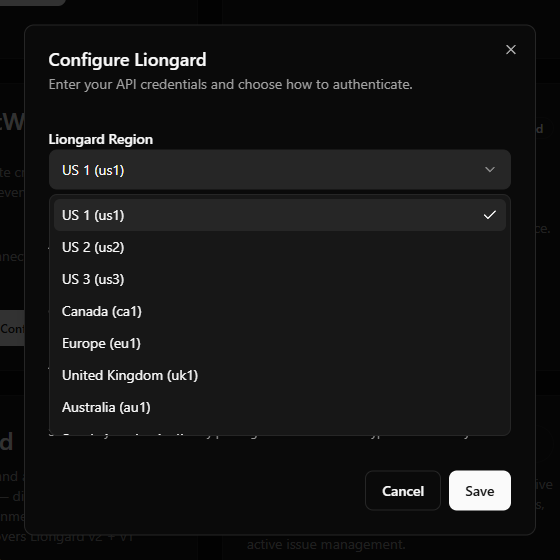
Liongard RegionPick your region: US 1–3, Canada, Europe, United Kingdom, Australia, or South America. The dialog shows a live URL preview so you can confirm it matches where you sign in.
Custom SubdomainOnly shown when you pick Other (custom) — enter just the subdomain (for example us4), with no protocol and no .app.liongard.com. Use this if Liongard adds a region that isn't in the dropdown yet.
Access Key IDThe Access Key from the pair you generated.
Access SecretThe one-time secret from the same pair.
  1. Click Save.

Liongard setup-field example with the region dropdown open, and again with "Other (custom)" selected showing the Custom Subdomain field and live URL preview.
Field-layout example from the earlier centered setup shell. The current Portal presents these controls in the connector's right-side drawer.

What happens when you save

  • Your key pair is stored encrypted in Azure Key Vault — it is never written to the StackJack database.
  • StackJack immediately tests the keys with a lightweight environment-count call against your Liongard instance. If the test fails, the credentials are still saved and you'll see a "saved, but validation failed" message with the reason so you can correct it.
  • A Free subscription for the Liongard connector is created automatically, so the Free-tier tools appear in your AI harness right away. Upgrade from the connector card whenever you're ready — current pricing is shown in the portal at checkout.

Health monitoring

StackJack periodically re-validates the connection. If it fails definitively three times in a row (for example, because the key pair was deleted in Liongard), the connector is automatically disabled and the tenant owner is emailed. The connector card then shows the error details along with Re-enable and Update Credentials buttons. (A card that is failing validation but not yet disabled shows a Re-test button instead.)

What your AI can do once connected

  • Free plan: read and query tools — environments and environment groups, agents, asset inventory (identities and devices), metrics and dataprint evaluation, timeline queries and detections, plus v1 reads (inspectors, systems, launchpoints, users, roles, alerts, tags, notes, service providers, the audit log) and v1 report downloads.
  • Pro / Business plans: everything in Free, plus write tools — create/update/delete environments and environment groups (including bulk variants), manage agents and generate agent installers, update devices and identities, acknowledge alerts, manage launchpoints and webhooks, manage v1 users, tags, and notes, and generate reports.
  • Business is the same tool set as Pro — the difference is the monthly usage allowance only. Liongard has no per-user OAuth flow, so per-user attribution is not available on any tier.

Usage notes worth passing to whoever drives the AI:

  • v1 vs v2 tools. Tools ending in _v1 hit Liongard's older v1 API; the rest use v2. They complement each other — some data (reports, inspectors, launchpoints) only exists on v1.
  • Report downloads are time-limited links. liongard_generate_report_v1 starts report generation asynchronously; once complete, liongard_download_report_v1 uploads the binary to StackJack's storage and returns a read-only download link. The link's lifetime is chosen per call (default 60 minutes, between 5 minutes and 24 hours), and reports are capped at 100 MB.
  • Usage caps. Each connector subscription has a monthly tool-call allowance (currently 100 calls on Free, 5,000 on Pro, 50,000 on Business per billing cycle). There is no per-minute burst limit on your MCP calls — the monthly cap is the enforcement point. Your usage bar is on the connector card and Dashboard.

Warning — the webhook signing-key tool is global. The liongard_generate_webhook_signing_key tool rotates your Liongard instance's global webhook signing key. That immediately invalidates signature verification for all existing webhook receivers you have pointed at Liongard — not just StackJack-related ones. Only use it deliberately, e.g. when rotating a compromised key.

Rate limits toward Liongard

Liongard enforces 2,000 requests per 5 minutes globally per API key, plus a stricter 100 requests per minute on its metrics-evaluation endpoint. StackJack honors both automatically, backing off when Liongard asks it to — long analytics sessions may pace themselves rather than fail.

Troubleshooting

SymptomLikely cause and fix
Validation fails right after savingWrong region selected (the key pair only works on your home instance), or a typo in the key/secret. Check the URL preview against your sign-in URL and re-paste the pair.
Tools return permission errorsThe service-account user behind the key lacks the role for that operation — write tools generally need Tenant-Admin or higher. Adjust the user's role in Liongard.
Connector shows DisabledThree consecutive validation failures — usually a deleted or regenerated key pair. Generate a new pair, save it via Update Credentials on the card, then Re-enable.
Webhook receivers suddenly reject Liongard payloadsSomeone (or an AI) ran liongard_generate_webhook_signing_key, rotating the global signing key. Update every webhook receiver with the new key.
A report download link expiredAsk for the report again with a longer link lifetime (up to 24 hours), or re-run the download tool for a fresh link.

Per-user access

Liongard does not support per-user sign-in through StackJack — the connector uses one shared key pair for the whole tenant, and all tool calls run as the Liongard user who generated the keys. (Per-user connector credentials are only available for HaloPSA, NinjaOne, and N-able N-central.)

Disconnecting

Disconnect on the Liongard card deletes the stored key pair from Key Vault, and Liongard calls on that connection stop working immediately. Where the card holds several connections, the others keep working and the connector stays connected until you remove the last one.

Whether Liongard's tools disappear from your AI's tool list is a separate choice rather than an automatic consequence. On the last connection of a Free connector the dialog offers to remove them, with the box selected by default. On a paid connector the tools stay listed and billing continues: disconnecting does not cancel a paid subscription. The plan controls only appear while the connector is connected, so end the plan before disconnecting. On a paid connector that button reads Manage on Billing and opens this connector's removal dialog on the Billing page; a legacy website subscription still reads Cancel Plan. If you've already disconnected, save your credentials again to bring the plan controls back, then end the plan. See Disconnecting a Connector for what else a removal reaches.

If you're disconnecting for security reasons, also delete the key pair in Liongard so the old values are dead everywhere.

Liongard tools

liongard_ · 77 tools · Free 44 · Pro 33

Environments

ToolWhat it does
liongard_count_environments
Free · Read-only
Returns the total number of environments visible to the API key.
liongard_create_environment
Pro · Write
Create a new environment.
liongard_create_environments_bulk
Pro · Write
Create multiple environments in one call.
liongard_delete_environment
Pro · Destructive
WARNING: Permanently delete an environment.
liongard_get_environment
Free · Read-only
Get a single environment by ID.
liongard_get_environment_related_entities
Free · Read-only
Fetch all dependent objects for an environment in one call: launchpoints, agents, integration mappings, and child environments.
liongard_list_environments
Free · Read-only
List environments (top-level customer/site containers).
liongard_query_environment_dashboard
Free · Read-only
Run dashboard-metric queries against a single environment.
liongard_update_environment
Pro · Write
Update a single environment by ID.
liongard_update_environments_bulk
Pro · Write
Update multiple environments in one call.

Environment Groups

ToolWhat it does
liongard_create_environment_group
Pro · Write
Create an environment group.
liongard_delete_environment_groups
Pro · Destructive
WARNING: Permanently delete one or more environment groups.
liongard_list_environment_groups
Free · Read-only
List environment groups.
liongard_update_environment_group
Pro · Write
Update a single environment group.

Agents

ToolWhat it does
liongard_delete_agents
Pro · Destructive
WARNING: Permanently delete one or more agents.
liongard_generate_agent_installer
Pro · Write
Generate a one-time installer download URL for a new agent in a specific environment.
liongard_list_agents
Free · Read-only
List agents (Liongard collectors deployed in customer networks).

Asset Inventory — Identities

ToolWhat it does
liongard_get_identity
Free · Read-only
Get a single identity by UUID.
liongard_list_identities
Free · Read-only
Query identities (users, service accounts, admins, guests, etc.) within an environment's asset inventory.
liongard_update_identities_bulk
Pro · Write
Bulk-update inventory state, status, and type across many identities.
liongard_update_identity
Pro · Write
Update a single identity's classification (type, status, location, inventoryState, isManual).

Asset Inventory — Devices

ToolWhat it does
liongard_get_device
Free · Read-only
Get a single device profile by UUID.
liongard_list_devices
Free · Read-only
Query device profiles within an environment's asset inventory.
liongard_update_device
Pro · Write
Update a device's classification or asset metadata.
liongard_update_devices_bulk
Pro · Write
Bulk-update inventory state, status, and type across many device profiles.

Metrics

ToolWhat it does
liongard_evaluate_metrics
Free · Read-only
Evaluate one or more metrics across systems and return the values.
liongard_evaluate_metrics_by_system
Free · Read-only
Evaluate ALL enabled metrics for a list of system IDs.
liongard_get_metric_related_environments
Free · Read-only
Returns the environment IDs where a given metric is currently evaluated.
liongard_list_metrics
Free · Read-only
List defined metrics.

Timeline & Detections

ToolWhat it does
liongard_list_detections
Free · Read-only
List detection events (alert-style records derived from inspector runs).
liongard_query_timeline
Free · Read-only
Query timeline entries (inspector runs).

Dataprints

ToolWhat it does
liongard_evaluate_dataprint
Free · Read-only
Run a JMESPath query against a system's inspection dataprint and return the matched values.

Webhooks

ToolWhat it does
liongard_create_webhook
Pro · Write
Register a new webhook.
liongard_delete_webhook
Pro · Destructive
Delete a webhook by UUID.
liongard_generate_webhook_signing_key
Pro · Destructive
WARNING: DESTRUCTIVE.
liongard_get_webhook
Free · Read-only
Get a single webhook by UUID.
liongard_list_webhooks
Free · Read-only
List configured webhooks.
liongard_update_webhook
Pro · Write
Update a single webhook.

Inspectors (v1)

ToolWhat it does
liongard_get_inspector_schema_v1
Free · Read-only
Returns the JSON schema for an inspector's dataprint output, including all property paths (JMESPath-compatible).
liongard_get_inspector_v1
Free · Read-only
Get a single inspector's metadata: name, version, description, inspection schedule, configuration schema.
liongard_list_inspectors_v1
Free · Read-only
List all inspectors available in this tenant.

Systems (v1)

ToolWhat it does
liongard_get_system_details_v1
Free · Read-only
Get the most recent inspection details (dataprint snapshot) for a system.
liongard_get_system_v1
Free · Read-only
Get a single system (inspector instance) with its current configuration and binding to an environment.
liongard_list_systems_v1
Free · Read-only
List inspector instances (systems).

Launchpoints (v1)

ToolWhat it does
liongard_create_launchpoint_v1
Pro · Write
Create a new launchpoint.
liongard_delete_launchpoint_v1
Pro · Destructive
Delete a launchpoint.
liongard_get_launchpoint_v1
Free · Read-only
Get a single launchpoint by ID with full configuration.
liongard_list_launchpoints_v1
Free · Read-only
List launchpoints (scheduled inspection triggers).
liongard_run_launchpoint_v1
Pro · Write
Trigger a manual ad-hoc run of a launchpoint's inspection.
liongard_update_launchpoint_v1
Pro · Write
Update launchpoint schedule or configuration.

Users (v1)

ToolWhat it does
liongard_create_user_v1
Pro · Write
Create a Liongard user.
liongard_delete_user_v1
Pro · Destructive
WARNING: Permanently delete a user.
liongard_get_user_v1
Free · Read-only
Get a single user by ID with full role and group memberships.
liongard_list_users_v1
Free · Read-only
List Liongard tenant users with their role assignments and account status.
liongard_update_user_v1
Pro · Write
Update user details or role assignments.

Service Providers (v1)

ToolWhat it does
liongard_get_service_provider_v1
Free · Read-only
Get a single service provider's metadata.
liongard_list_service_providers_v1
Free · Read-only
List service providers (top-level MSP entities).

Reports (v1)

ToolWhat it does
liongard_download_report_v1
Free · Read-only
Download a generated report binary and return a short-lived SAS URL pointing to the blob-stored copy.
liongard_generate_report_v1
Pro · Write
Trigger report generation.
liongard_get_report_v1
Free · Read-only
Get a single report's metadata: status (pending/running/complete/failed), generated_at, expires_at, source data.
liongard_list_reports_v1
Free · Read-only
List Liongard reports (audit outputs, configuration snapshots, etc.) with their generation status.

Alerts (v1)

ToolWhat it does
liongard_acknowledge_alert_v1
Pro · Destructive
Mark an alert as acknowledged.
liongard_get_alert_v1
Free · Read-only
Get a single alert by ID with full context.
liongard_list_alerts_v1
Free · Read-only
List alerts (notifications from inspector runs).

Tags (v1)

ToolWhat it does
liongard_create_tag_v1
Pro · Write
Create a new tag.
liongard_delete_tag_v1
Pro · Destructive
Delete a tag.
liongard_get_tag_v1
Free · Read-only
Get a single tag by ID.
liongard_list_tags_v1
Free · Read-only
List all tags defined in this tenant.
liongard_update_tag_v1
Pro · Write
Update tag metadata.

Notes (v1)

ToolWhat it does
liongard_create_note_v1
Pro · Write
Create a note attached to an entity.
liongard_delete_note_v1
Pro · Destructive
Delete a note.
liongard_get_note_v1
Free · Read-only
Get a single note by ID.
liongard_list_notes_v1
Free · Read-only
List notes.
liongard_update_note_v1
Pro · Write
Update note text or metadata.

Roles (v1)

ToolWhat it does
liongard_get_role_v1
Free · Read-only
Get a single role by ID with its full permission set.
liongard_list_roles_v1
Free · Read-only
List all roles defined in this tenant.

Audit Log (v1)

ToolWhat it does
liongard_list_audit_log_v1
Free · Read-only
List audit log entries with optional date-range filter.